
@magpie-community/page-chat
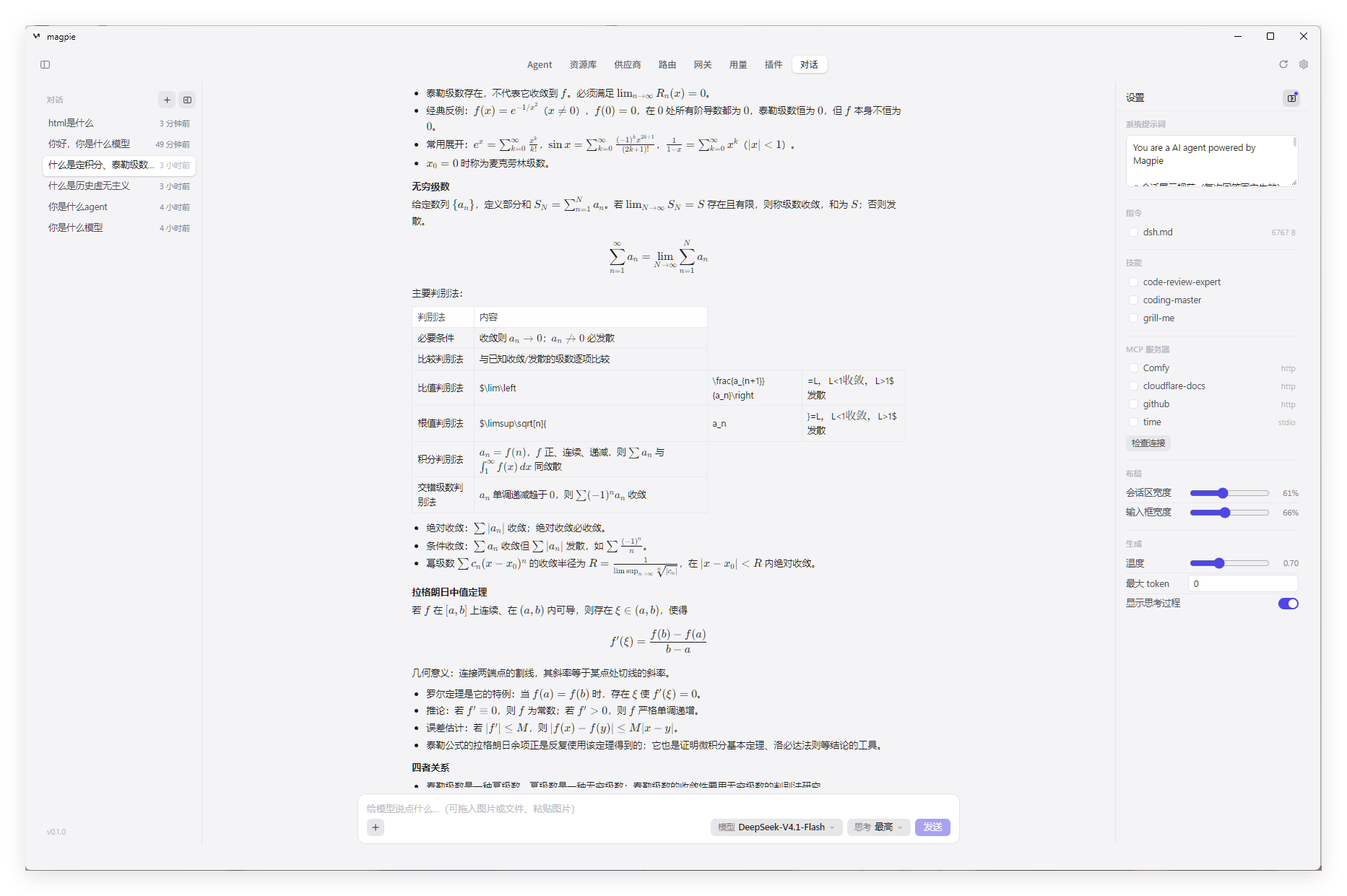
A chat page in magpie's window. Talk to magpie's own models with your MCP servers, instructions and skills, with images and LaTeX, without starting an agent.
Made by Magic_zero (Magiczerowxy), from Magiczerowxy/magpie-chat (0.1.18). This package is that code, with the changes listed under Changes from the original.
Install
From magpie's Plugins › Discover, or:
magpie plugin add @magpie-community/page-chat
It then has a tab, Chat (对话, 對話, チャット), under Plugins in the sidebar.
What it does
- magpie's models. The list comes from the gateway's
/v1/models. Models with reasoning levels get an effort picker. - magpie's library. Tick instructions and skills from
~/.config/magpie/library/(folded into the system prompt), and MCP servers fromlibrary.json(their tools run as realtool_calls, at most 8 rounds, Streamable HTTP and stdio). - Images and files. Pick, drop or paste them. Images go to the model as
image_url. - Streaming. Reasoning unfolds while it arrives, then collapses.
- Math.
$…$,$$…$$,\(…\)and\[…\]render with a bundled KaTeX 0.16.11. No CDN. - Conversations kept, pinned or deleted, under
~/.config/magpie/magpie-chat/. - Looks like magpie. Colors and fonts come from the window's theme.
It registers no provider, asks for no sign-in and stores no credentials of its own. Every request goes out through magpie's gateway, so usage, routing and failover are the same as an agent's.
How it works
A plugin page runs in a sandboxed frame with no network (connect-src 'none'). Its only way out is to navigate itself. So this plugin has two parts:
page/index.htmlandpage/boot.js: a launcher magpie hosts. It reads the window's theme and theportoption through_magpie/bridge.js, then sends its frame tohttp://127.0.0.1:<port>/. It makes no request of its own.index.mjs: an OpenCode v1 plugin (export default {id, server}). When magpie's plugin host callsserver(), it starts a local service on127.0.0.1:3477(theportoption).lib/server.mjsserves the chat UI inchat/and/api/*, and forwards chat to magpie's gateway.
What the service reads and sends
- From magpie's config folder (
$XDG_CONFIG_HOME/magpieor~/.config/magpie):caller-keys.json(the first gateway key, sent asAuthorization: Bearerto the gateway, so the chat's usage is counted on that key),providers.jsonandrouting.json(icons),settings.json(fonts),library.jsonandlibrary/(MCP servers, instructions, skills). - To magpie's gateway:
MAGPIE_CHAT_GATEWAYif set, elseMAGPIE_ADDR, elsehttp://127.0.0.1:3425. The key goes there, so setMAGPIE_CHAT_GATEWAYonly to a gateway you trust. - To your MCP servers: what the model asks their tools, with the headers you configured for them. A stdio server's command is run as you configured it.
Who can use the service
Only the chat page it served:
- Every
/api/route needsx-magpie-chat-token, a random token made each time the service starts. The service writes it into the chat page's HTML, which it sends without CORS headers, so another page can't read it./api/ping,/api/fonts.cssand/api/icon/*are open; they give nothing secret. Hostmust be127.0.0.1:<port>orlocalhost:<port>, so a DNS-rebound page is turned away.Originmust benull(the sandboxed frame) or the service's own.
Options
{ "port": 3477 }
The launcher and the service both read it. Change it if something else holds 3477.
Starting it without magpie's host
serve.mjs (node serve.mjs, or start-server.cmd / start-server.vbs on Windows) starts the same service on its own, and install-autostart.cmd puts it in Windows' Startup folder. See SERVE.md. None of these runs unless you start it.
Changes from the original
- The service answered
Origin: nulland requests with no Origin, and didn't checkHost. Any website's sandboxed iframe sendsOrigin: null, so it could chat on your gateway key, read and change conversations and settings, and drive your MCP tools. A DNS-rebound page could read conversations. The token and the Host check above close it. - The service started when
index.mjswas imported, on 3477 whatever theportoption said, while the launcher went to the option's port. It now starts when the host callsserver(), on the option's port. - A remote provider icon answered 302 with no
Location. It has one. /api/bootstrapsaid version0.1.0whatever the version. It says the package's.
Known limits
- The page opens the service on this computer's 127.0.0.1, so
magpie webused from another machine won't reach it. - MCP has no legacy GET SSE stream and no reconnect.
- Images go inline as base64, at most 24MB each.
- Built-in provider icons live inside magpie's binary; when one can't be read, the service draws a letter badge.
Test
bun test packages/chat
The test starts the service on a free port against a fake gateway, in a temporary config folder.
License
MIT, © 2026 Magiczerowxy. See LICENSE.
中文:Magic_zero(Magiczerowxy)做的「对话」页面,来自 Magiczerowxy/magpie-chat。装好后侧栏「插件」里点「对话」,就能用 magpie 自己的模型聊天,带上你的 MCP 服务器、指令和技能,支持图片与 LaTeX。它不注册供应商、不保存凭据,请求都经 magpie 网关发出,用的是 caller-keys.json 里第一把网关 key。本地服务只听 127.0.0.1,每个 /api/ 请求都要带上服务写进对话页里的口令,并检查 Host,别的网页用不了它。