page-chat 0.1.0: Magic_zero's chat page, with tests, a registry entry and check.mjs for a page's host part
Lists Magic_zero's (Magiczerowxy) magpie-chat as @magpie-community/page-chat:
a chat page in magpie's window over magpie's own gateway, models, MCP
servers, instructions and skills. Not a provider or a relay: it signs in
to nothing and every request goes through magpie's gateway.

- chat.test.mjs starts the service on a free port against a fake
  gateway in a temp config folder: no token (Origin null and none), a
  wrong token, another Origin and a rebound Host are refused and nothing
  reaches the gateway; with the token a chat streams with the caller key;
  the icon redirect has a Location; boot.js makes no request; app.js
  sends the token.
- scripts/check.mjs takes the OpenCode v1 default export {id, server}
  as magpie's host does, and doesn't start a page's server (it would bind
  a port and write config); layerfs's tools are still checked.
- package.json declares the port option (3477) both parts read; boot.js's
  comment says so instead of a fallback to 3478 that never existed.
- README in the repo's style with credit, what the service reads and
  sends, who can use it, and the changes from the original.
- registry.json entry and a row in the Pages table.

Run on mote (bun 1.4.2) at this tree:
- cd packages/chat && HOME=$(mktemp -d) bun test: 11 pass.
- HOME=$(mktemp -d) bun test (whole repo): 3119 pass, 0 fail, 3127
  tests across 261 files; bun scripts/check.mjs: exit 0, chat and
  layerfs ok.
Broken by hand: with the token check off, "a page without the token
can't chat" went red; with the Host check off, "a DNS-rebound Host is
refused" went red.
Not tried: the page in a real magpie window (sandboxed frame navigation
and the host calling server()).

Co-authored-by: Magiczerowxy <magiczerowxy@users.noreply.github.com>
This commit is contained in:
 yetone
@@ -113,6 +113,7 @@ These add a page to magpie's window, in the app and in `magpie web`, under Plugi
|
||||
| Package | Page | Reads |
|
||||
|---|---|---|
|
||||
| [usage](packages/usage) | Usage glance: calls, errors, tokens and cost for today, 7 or 30 days, and the models behind them | `usage:summary` |
|
||||
| [chat](packages/chat) | Chat with magpie's models, your MCP servers, instructions and skills, by Magic_zero ([Magiczerowxy](https://github.com/Magiczerowxy)). Has a host part: a local service the page goes to | none (its service calls magpie's gateway) |
|
||||
|
||||
```sh
|
||||
magpie plugin add @magpie-community/page-<name>
|
||||
@@ -123,6 +124,7 @@ A page package is a folder under `packages/<name>/` with:
|
||||
- **`package.json`**: name `@magpie-community/page-<name>`, no `main`, and `"magpie": {"page": {"title", "file", "icon"}, "permissions": [...], "options": {…}}` ([the reference](https://usemagpie.ai/docs/plugins#pages)). `permissions` lists the reads the page makes, and magpie refuses any other. Declare only what it reads.
|
||||
- **the page**: HTML, CSS and scripts in files. It runs in a sandboxed frame with no network (`connect-src 'none'`) and no inline scripts. It talks to magpie only through `_magpie/bridge.js`: `magpie.ready`, `magpie.read(name, params)`, `magpie.options.get/set` (at most once a second), and `magpie.theme` with `onTheme`, whose `--magpie-*` variables it styles itself by.
|
||||
- a test that the page's scripts read only what `permissions` declares and reach no network, and of what it draws from a read.
|
||||
- optionally a host part: `main` with the OpenCode v1 form `export default {id, server}`, where `server(input, options)` starts a service on 127.0.0.1 that the page navigates its frame to. Such a service guards every route with a token only its own page gets, and checks `Host` ([chat](packages/chat) is the example).
|
||||
|
||||
## Agents
|
||||
|
||||
|
||||
+86
-161
@@ -1,167 +1,92 @@
|
||||
# magpie-chat
|
||||
# @magpie-community/page-chat
|
||||
|
||||
**在 magpie 窗口里加一个「对话」页面。** 用 magpie 已经接好的模型、指令、技能和 MCP 服务器聊天,不用再开一个 Agent。
|
||||
A chat page in [magpie](https://usemagpie.ai)'s window. Talk to magpie's own models with your MCP servers, instructions and skills, with images and LaTeX, without starting an agent.
|
||||
|
||||
**A chat page inside magpie's window.** Talk with magpie's own models, instructions, skills and MCP servers — no second agent needed.
|
||||
Made by **Magic_zero** ([Magiczerowxy](https://github.com/Magiczerowxy)), from [Magiczerowxy/magpie-chat](https://github.com/Magiczerowxy/magpie-chat) (0.1.18). This package is that code, with the changes listed under [Changes from the original](#changes-from-the-original).
|
||||
|
||||
[](https://github.com/Magiczerowxy/magpie-chat)
|
||||
[](LICENSE)
|
||||
|
||||
|
||||
## Install
|
||||
|
||||
From magpie's **Plugins › Discover**, or:
|
||||
|
||||
```sh
|
||||
magpie plugin add @magpie-community/page-chat
|
||||
```
|
||||
|
||||
It then has a tab, **Chat** (对话, 對話, チャット), under Plugins in the sidebar.
|
||||
|
||||
## What it does
|
||||
|
||||
- **magpie's models.** The list comes from the gateway's `/v1/models`. Models with reasoning levels get an effort picker.
|
||||
- **magpie's library.** Tick instructions and skills from `~/.config/magpie/library/` (folded into the system prompt), and MCP servers from `library.json` (their tools run as real `tool_calls`, at most 8 rounds, Streamable HTTP and stdio).
|
||||
- **Images and files.** Pick, drop or paste them. Images go to the model as `image_url`.
|
||||
- **Streaming.** Reasoning unfolds while it arrives, then collapses.
|
||||
- **Math.** `$…$`, `$$…$$`, `\(…\)` and `\[…\]` render with a bundled KaTeX 0.16.11. No CDN.
|
||||
- **Conversations kept**, pinned or deleted, under `~/.config/magpie/magpie-chat/`.
|
||||
- **Looks like magpie.** Colors and fonts come from the window's theme.
|
||||
|
||||
It registers no provider, asks for no sign-in and stores no credentials of its own. Every request goes out through magpie's gateway, so usage, routing and failover are the same as an agent's.
|
||||
|
||||
## How it works
|
||||
|
||||
A plugin page runs in a sandboxed frame with no network (`connect-src 'none'`). Its only way out is to navigate itself. So this plugin has two parts:
|
||||
|
||||
1. `page/index.html` and `page/boot.js`: a launcher magpie hosts. It reads the window's theme and the `port` option through `_magpie/bridge.js`, then sends its frame to `http://127.0.0.1:<port>/`. It makes no request of its own.
|
||||
2. `index.mjs`: an OpenCode v1 plugin (`export default {id, server}`). When magpie's plugin host calls `server()`, it starts a local service on `127.0.0.1:3477` (the `port` option). `lib/server.mjs` serves the chat UI in `chat/` and `/api/*`, and forwards chat to magpie's gateway.
|
||||
|
||||
### What the service reads and sends
|
||||
|
||||
- From magpie's config folder (`$XDG_CONFIG_HOME/magpie` or `~/.config/magpie`): `caller-keys.json` (the first gateway key, sent as `Authorization: Bearer` to the gateway, so the chat's usage is counted on that key), `providers.json` and `routing.json` (icons), `settings.json` (fonts), `library.json` and `library/` (MCP servers, instructions, skills).
|
||||
- To magpie's gateway: `MAGPIE_CHAT_GATEWAY` if set, else `MAGPIE_ADDR`, else `http://127.0.0.1:3425`. The key goes there, so set `MAGPIE_CHAT_GATEWAY` only to a gateway you trust.
|
||||
- To your MCP servers: what the model asks their tools, with the headers you configured for them. A stdio server's command is run as you configured it.
|
||||
|
||||
### Who can use the service
|
||||
|
||||
Only the chat page it served:
|
||||
|
||||
- Every `/api/` route needs `x-magpie-chat-token`, a random token made each time the service starts. The service writes it into the chat page's HTML, which it sends without CORS headers, so another page can't read it. `/api/ping`, `/api/fonts.css` and `/api/icon/*` are open; they give nothing secret.
|
||||
- `Host` must be `127.0.0.1:<port>` or `localhost:<port>`, so a DNS-rebound page is turned away.
|
||||
- `Origin` must be `null` (the sandboxed frame) or the service's own.
|
||||
|
||||
## Options
|
||||
|
||||
```json
|
||||
{ "port": 3477 }
|
||||
```
|
||||
|
||||
The launcher and the service both read it. Change it if something else holds 3477.
|
||||
|
||||
## Starting it without magpie's host
|
||||
|
||||
`serve.mjs` (`node serve.mjs`, or `start-server.cmd` / `start-server.vbs` on Windows) starts the same service on its own, and `install-autostart.cmd` puts it in Windows' Startup folder. See [SERVE.md](SERVE.md). None of these runs unless you start it.
|
||||
|
||||
## Changes from the original
|
||||
|
||||
- The service answered `Origin: null` and requests with no Origin, and didn't check `Host`. Any website's sandboxed iframe sends `Origin: null`, so it could chat on your gateway key, read and change conversations and settings, and drive your MCP tools. A DNS-rebound page could read conversations. The token and the Host check above close it.
|
||||
- The service started when `index.mjs` was imported, on 3477 whatever the `port` option said, while the launcher went to the option's port. It now starts when the host calls `server()`, on the option's port.
|
||||
- A remote provider icon answered 302 with no `Location`. It has one.
|
||||
- `/api/bootstrap` said version `0.1.0` whatever the version. It says the package's.
|
||||
|
||||
## Known limits
|
||||
|
||||
- The page opens the service on this computer's 127.0.0.1, so `magpie web` used from another machine won't reach it.
|
||||
- MCP has no legacy GET SSE stream and no reconnect.
|
||||
- Images go inline as base64, at most 24MB each.
|
||||
- Built-in provider icons live inside magpie's binary; when one can't be read, the service draws a letter badge.
|
||||
|
||||
## Test
|
||||
|
||||
```sh
|
||||
bun test packages/chat
|
||||
```
|
||||
|
||||
The test starts the service on a free port against a fake gateway, in a temporary config folder.
|
||||
|
||||
## License
|
||||
|
||||
MIT, © 2026 Magiczerowxy. See [LICENSE](LICENSE).
|
||||
|
||||
---
|
||||
|
||||
## 中文
|
||||
|
||||
### 功能
|
||||
|
||||
- **一个页面**。装好后侧栏「插件」分组里出现「对话」。
|
||||
- **用 magpie 的模型**。模型列表来自网关 `/v1/models`,切换即时生效;有推理档位的模型会给出对应的思考强度选项。
|
||||
- **用 magpie 的配置**。右侧栏里勾选 `~/.config/magpie/library/` 的指令与技能(拼进 system prompt)、勾选 MCP 服务器(工具以 `tool_calls` 真正执行)。
|
||||
- **多模态**。左下角「+」选图片或文件,也可以直接把文件拖进页面,或粘贴剪贴板里的图片。图片以 `image_url` 交给模型,气泡里显示缩略图、点开看大图。
|
||||
- **流式输出**。思考过程边收边展开,输出结束后自动收起;正文逐字出现。
|
||||
- **公式**。`$…$`、`$$…$$`、`\(…\)`、`\[…\]` 由本地 KaTeX 渲染,随包打包,不连 CDN。
|
||||
- **对话留存**。存在 magpie 配置目录的 `magpie-chat/conversations/`;每条可以置顶或删除。
|
||||
- **和 magpie 同一个样子**。配色与字体取自 magpie 自己的设计令牌,切换主题时对话页跟着变。
|
||||
- **可调布局**。右侧栏「布局」里两个滑条:会话区宽度(100% 即铺满,最窄 560px)、输入框宽度;左右两侧栏都能拖拽调宽、也都能收起。
|
||||
- **代码折叠**。一条消息里有多段代码时只展开最后一段,其余收起。
|
||||
|
||||
### 截图
|
||||
|
||||
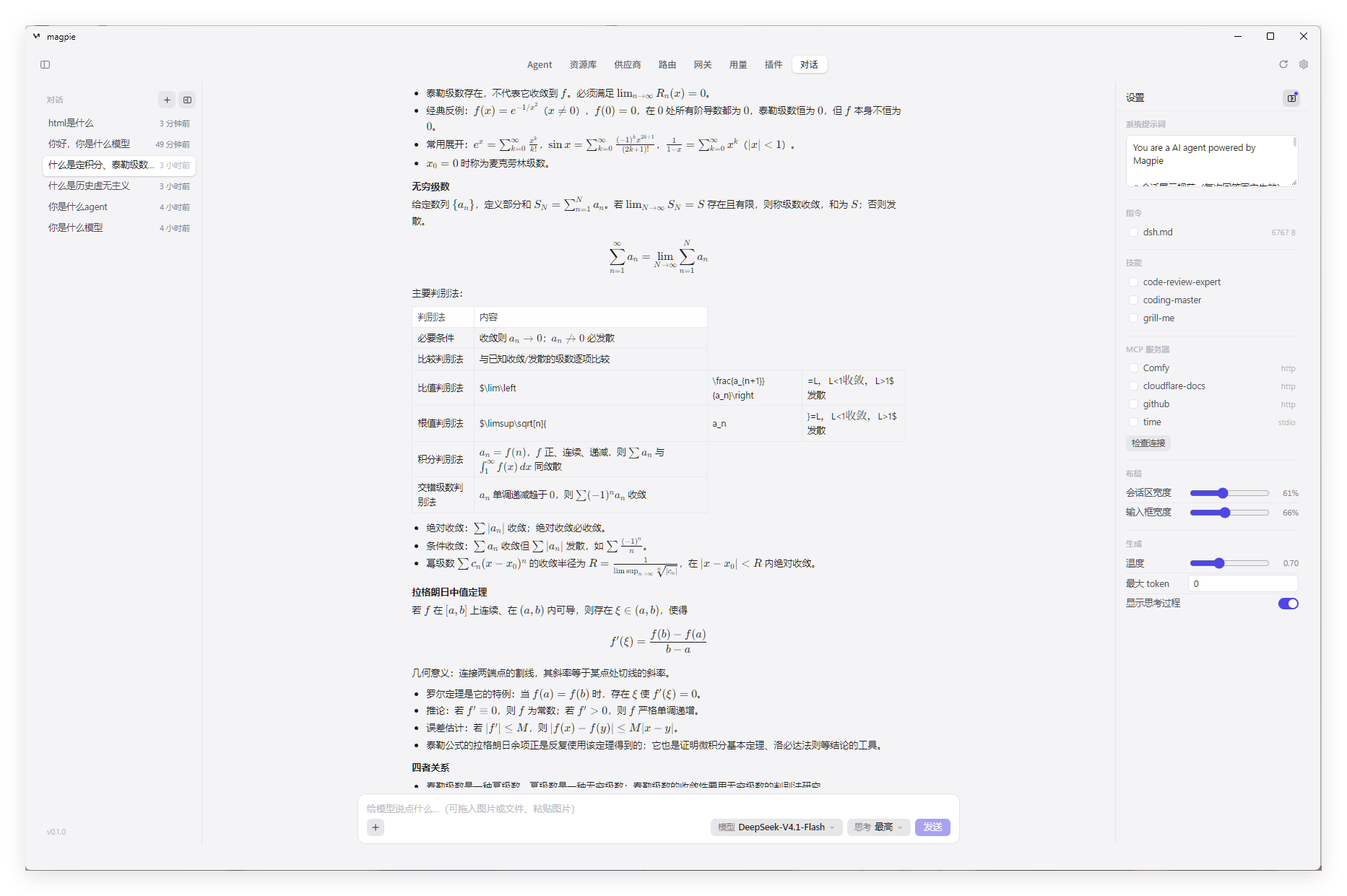
在 magpie 窗口里的一次真实对话:公式由本地 KaTeX 渲染,表格正常排版,右侧设置栏可以调会话区与输入框宽度。
|
||||
|
||||

|
||||
|
||||
### 安装
|
||||
|
||||
```powershell
|
||||
magpie plugin add Magiczerowxy/magpie-chat
|
||||
```
|
||||
|
||||
或者在应用里:**插件 → 发现 → 非官方插件 · GitHub**,搜索 `magpie-chat` 后点「安装」。
|
||||
|
||||
装好后侧栏「插件」里点「对话」即可。
|
||||
|
||||
### 没有登录,也没有账号
|
||||
|
||||
这个插件**不注册供应商、不需要登录、不保存任何凭据**。它复用 magpie 自己已经配好的模型和额度,请求全部由 magpie 的网关发出,所以用量统计与故障切换和 Agent 一致。
|
||||
|
||||
它只保存你自己的东西,都在 magpie 配置目录下:
|
||||
|
||||
```
|
||||
~/.config/magpie/magpie-chat/
|
||||
├── settings.json 模型、思考强度、系统提示词、勾选的指令/技能/MCP、窗口布局
|
||||
└── conversations/ 每个对话一个 JSON
|
||||
```
|
||||
|
||||
### 它怎么工作
|
||||
|
||||
magpie 的插件页面跑在 `sandbox="allow-scripts"` 的框架里:没有网络权限、不能内嵌框架、不能用存储,唯一允许的联网动作是把自身导航到别处。所以这个插件是两层的:
|
||||
|
||||
1. `page/index.html` 是 magpie 托管的「带路页」,读窗口主题后 `location.replace` 到本地服务。
|
||||
2. `index.mjs` 作为 OpenCode v1 插件被 magpie 的 Bun 宿主加载,加载时启动那个本地服务(`127.0.0.1:3477`)。
|
||||
3. `lib/server.mjs` 提供 `/api/*` 并把聊天请求转发给 magpie 网关;`chat/` 是真正的界面。
|
||||
|
||||
服务只监听回环地址,并拒绝非同源请求(只接受 opaque 的 `Origin: null` 与自身 origin),任意网页都无法借它消耗额度。
|
||||
|
||||
### 打不开怎么办
|
||||
正常情况下装好、重启 magpie,打开「对话」就能用(干净环境实测 397ms 服务就绪)。
|
||||
|
||||
如果看到这个页面卡住或「127.0.0.1 拒绝连接」:
|
||||
|
||||
1. 先看 `magpie plugin` 的输出,有没有插件在反复报登录失败 / 401。
|
||||
宿主加载插件是排队走的,前面卡住会拖到后面的页面插件。
|
||||
2. 把一直报错的插件停掉:`magpie plugin off <那个插件>`
|
||||
3. 还不行就用独立启动兜底:双击插件目录里的 `start-server.cmd`
|
||||
(或 `start-server.vbs` 静默启动),再用 `install-autostart.cmd` 设成开机自启。
|
||||
|
||||
细节见 [SERVE.md](SERVE.md)。
|
||||
|
||||
### 已知限制
|
||||
|
||||
- MCP 实现了 Streamable HTTP 与 stdio,不含旧版 GET SSE 长连接与断线重连。
|
||||
- 图片以 base64 内联发送,单图上限 24MB;对话很长时请求体也会变大。
|
||||
- 供应商图标:magpie 的内置图标编在它自己的二进制里,取不到时服务端会画一个首字母 SVG。
|
||||
- 工具调用最多 8 轮。
|
||||
|
||||
---
|
||||
|
||||
## English
|
||||
|
||||
### What it does
|
||||
|
||||
- **One page.** Once installed, a **Chat** page appears under Plugins in the sidebar.
|
||||
- **Uses magpie's own models.** The model list comes from the gateway's `/v1/models`; switching takes effect immediately, and models with reasoning levels get a thinking-effort picker.
|
||||
- **Uses magpie's own library.** Tick instructions and skills from `~/.config/magpie/library/` (folded into the system prompt) and MCP servers (their tools run as real `tool_calls`).
|
||||
- **Multimodal.** Pick images or files with the "+" button, drop files anywhere on the page, or paste an image. Images go to the model as `image_url`; thumbnails appear in the bubble and open full size.
|
||||
- **Streaming.** Reasoning unfolds while it arrives and collapses automatically when the answer is done; the reply streams in.
|
||||
- **Math.** `$…$`, `$$…$$`, `\(…\)` and `\[…\]` render through a bundled KaTeX — no CDN.
|
||||
- **Conversations persist.** Stored under `magpie-chat/conversations/` in magpie's config directory; each can be pinned or deleted.
|
||||
- **Looks like magpie.** Colors and fonts come from magpie's own design tokens, so the page follows the window theme.
|
||||
- **Adjustable layout.** Two sliders under Layout: conversation width (100% fills the pane, never narrower than 560px) and composer width. Both sidebars can be dragged and collapsed.
|
||||
- **Collapsible code.** When a reply has several code blocks, only the last one is expanded.
|
||||
|
||||
### Screenshot
|
||||
|
||||
A real conversation inside magpie's window: math rendered by the bundled KaTeX, tables laid out normally, and the settings sidebar on the right for adjusting conversation and composer width.
|
||||
|
||||

|
||||
|
||||
### Install
|
||||
|
||||
```powershell
|
||||
magpie plugin add Magiczerowxy/magpie-chat
|
||||
```
|
||||
|
||||
Or in the app: **Plugins → Discover → Unofficial · GitHub**, search `magpie-chat`, click Install.
|
||||
|
||||
Then open **Chat** under Plugins in the sidebar.
|
||||
|
||||
### No sign-in, no account
|
||||
|
||||
This plugin **registers no provider, asks for no login, and stores no credentials**. It reuses whatever magpie itself is already signed in to; every request goes out through magpie's gateway, so usage and failover match the agent exactly.
|
||||
|
||||
What it does store is only yours, all under magpie's config directory:
|
||||
|
||||
```
|
||||
~/.config/magpie/magpie-chat/
|
||||
├── settings.json model, effort, system prompt, ticked instructions/skills/MCP, layout
|
||||
└── conversations/ one JSON per conversation
|
||||
```
|
||||
|
||||
### How it works
|
||||
|
||||
magpie's plugin pages run in a `sandbox="allow-scripts"` frame: no network, no nested frames, no storage. The only way out is to navigate itself somewhere else. So this plugin is two layers:
|
||||
|
||||
1. `page/index.html` is a small launcher hosted by magpie; it reads the window theme and `location.replace`s to the local service.
|
||||
2. `index.mjs` is loaded as an OpenCode v1 plugin by magpie's Bun host, and starts that local service (`127.0.0.1:3477`).
|
||||
3. `lib/server.mjs` serves `/api/*` and forwards chat requests to magpie's gateway; `chat/` is the real UI.
|
||||
|
||||
The service binds loopback only and refuses any request whose Origin is neither opaque `null` (the sandboxed frame) nor its own, so no web page can borrow it to spend your quota.
|
||||
|
||||
### Known limits
|
||||
|
||||
- MCP covers Streamable HTTP and stdio; no legacy GET SSE stream or reconnect.
|
||||
- Images are sent inline as base64, 24MB per image; long conversations make bigger requests.
|
||||
- Provider icons live inside magpie's own binary; when one can't be read the server draws a letter badge.
|
||||
- At most 8 tool-call rounds.
|
||||
|
||||
---
|
||||
|
||||
## 目录 / Layout
|
||||
|
||||
```
|
||||
index.mjs 插件入口(启动本地服务) / plugin entry, starts the local service
|
||||
page/ 带路页,magpie 托管 / launcher page, hosted by magpie
|
||||
chat/ 对话界面 / the chat UI (index.html, app.js, style.css, vendor/katex)
|
||||
lib/server.mjs HTTP 路由、SSE、设置与对话持久化 / routes, SSE, settings, persistence
|
||||
lib/gateway.mjs magpie 网关客户端 / gateway client
|
||||
lib/library.mjs 读取指令、技能、MCP 与供应商图标 / reads instructions, skills, MCP, icons
|
||||
lib/mcp.mjs MCP 客户端(Streamable HTTP + stdio)/ MCP client
|
||||
assets/icon.svg 插件图标 / plugin icon
|
||||
```
|
||||
|
||||
无需构建,仓库里的文件就是 magpie 加载的文件。
|
||||
No build step: the files in this repo are exactly what magpie loads.
|
||||
|
||||
## 许可 / License
|
||||
|
||||
MIT
|
||||
中文:Magic_zero([Magiczerowxy](https://github.com/Magiczerowxy))做的「对话」页面,来自 [Magiczerowxy/magpie-chat](https://github.com/Magiczerowxy/magpie-chat)。装好后侧栏「插件」里点「对话」,就能用 magpie 自己的模型聊天,带上你的 MCP 服务器、指令和技能,支持图片与 LaTeX。它不注册供应商、不保存凭据,请求都经 magpie 网关发出,用的是 `caller-keys.json` 里第一把网关 key。本地服务只听 127.0.0.1,每个 `/api/` 请求都要带上服务写进对话页里的口令,并检查 `Host`,别的网页用不了它。
|
||||
|
||||
@@ -0,0 +1,179 @@
|
||||
// The chat page's local service holds the user's magpie gateway key, their
|
||||
// conversations and their MCP tools, so it answers only the chat page it
|
||||
// served: a request needs the per-process token from that page's HTML and
|
||||
// this service's own Host. Everything here runs against a fake gateway on a
|
||||
// free port, with a temporary config folder; nothing reaches the network.
|
||||
import { afterAll, beforeAll, expect, test } from "bun:test"
|
||||
import { mkdirSync, mkdtempSync, readFileSync, rmSync, writeFileSync } from "node:fs"
|
||||
import { request } from "node:http"
|
||||
import { tmpdir } from "node:os"
|
||||
import { join } from "node:path"
|
||||
|
||||
const dir = import.meta.dir
|
||||
const tmp = mkdtempSync(join(tmpdir(), "page-chat-"))
|
||||
const cfg = join(tmp, "magpie")
|
||||
mkdirSync(cfg, { recursive: true })
|
||||
writeFileSync(join(cfg, "caller-keys.json"), JSON.stringify([{ name: "chat", secret: "mk-test-key" }]))
|
||||
process.env.XDG_CONFIG_HOME = tmp
|
||||
delete process.env.MAGPIE_API_KEY
|
||||
delete process.env.MAGPIE_GATEWAY_KEY
|
||||
delete process.env.MAGPIE_ADDR
|
||||
|
||||
const seen = []
|
||||
const gateway = Bun.serve({
|
||||
port: 0,
|
||||
hostname: "127.0.0.1",
|
||||
async fetch(req) {
|
||||
const url = new URL(req.url)
|
||||
if (url.pathname === "/v1/models") return Response.json({ data: [{ id: "fake/model", owned_by: "fake" }] })
|
||||
if (url.pathname === "/v1/chat/completions") {
|
||||
seen.push({ auth: req.headers.get("authorization"), body: await req.json() })
|
||||
const chunk = (o) => `data: ${JSON.stringify(o)}\n\n`
|
||||
const body = chunk({ choices: [{ delta: { content: "hel" } }] })
|
||||
+ chunk({ choices: [{ delta: { content: "lo" }, finish_reason: "stop" }] })
|
||||
+ "data: [DONE]\n\n"
|
||||
return new Response(body, { headers: { "content-type": "text/event-stream" } })
|
||||
}
|
||||
return new Response("no", { status: 404 })
|
||||
},
|
||||
})
|
||||
process.env.MAGPIE_CHAT_GATEWAY = `http://127.0.0.1:${gateway.port}`
|
||||
|
||||
let svc, port, token
|
||||
beforeAll(async () => {
|
||||
const { startServer } = await import("./lib/server.mjs")
|
||||
svc = await startServer({ configDir: cfg, options: { port: 0 } })
|
||||
port = svc.port
|
||||
const page = await raw("GET", "/")
|
||||
token = /name="magpie-chat-token" content="([0-9a-f]+)"/.exec(page.body)?.[1]
|
||||
})
|
||||
afterAll(async () => {
|
||||
await svc?.close()
|
||||
gateway.stop(true)
|
||||
rmSync(tmp, { recursive: true, force: true })
|
||||
})
|
||||
|
||||
// node:http, so the test sets Host and Origin exactly as a hostile page would
|
||||
function raw(method, path, headers = {}, body) {
|
||||
return new Promise((resolve, reject) => {
|
||||
const req = request({ host: "127.0.0.1", port, method, path, headers: { host: `127.0.0.1:${port}`, ...headers } }, (res) => {
|
||||
let data = ""
|
||||
res.setEncoding("utf8")
|
||||
res.on("data", (c) => (data += c))
|
||||
res.on("end", () => resolve({ status: res.statusCode, headers: res.headers, body: data }))
|
||||
})
|
||||
req.on("error", reject)
|
||||
if (body !== undefined) req.write(typeof body === "string" ? body : JSON.stringify(body))
|
||||
req.end()
|
||||
})
|
||||
}
|
||||
|
||||
const chatBody = { model: "fake/model", messages: [{ role: "user", content: "hi" }] }
|
||||
const json = { "content-type": "application/json" }
|
||||
|
||||
test("the page's HTML carries the token and no CORS header", async () => {
|
||||
const res = await raw("GET", "/", { origin: "null" })
|
||||
expect(res.status).toBe(200)
|
||||
expect(token).toMatch(/^[0-9a-f]{64}$/)
|
||||
expect(res.headers["access-control-allow-origin"]).toBeUndefined()
|
||||
})
|
||||
|
||||
test("a page without the token can't chat or read conversations (Origin null, as a sandboxed frame sends)", async () => {
|
||||
const before = seen.length
|
||||
const chat = await raw("POST", "/api/chat", { ...json, origin: "null" }, chatBody)
|
||||
expect(chat.status).toBe(403)
|
||||
expect(seen.length).toBe(before) // nothing went to the gateway
|
||||
for (const path of ["/api/conversations", "/api/settings", "/api/bootstrap", "/api/library", "/api/mcp/tools"]) {
|
||||
expect((await raw("GET", path, { origin: "null" })).status).toBe(403)
|
||||
expect((await raw("GET", path)).status).toBe(403) // no Origin at all
|
||||
}
|
||||
const wrong = await raw("GET", "/api/conversations", { origin: "null", "x-magpie-chat-token": "0".repeat(64) })
|
||||
expect(wrong.status).toBe(403)
|
||||
expect(JSON.parse(wrong.body).reload).toBe(true)
|
||||
})
|
||||
|
||||
test("another site's Origin is refused even with the token", async () => {
|
||||
const res = await raw("GET", "/api/conversations", { origin: "https://evil.example", "x-magpie-chat-token": token })
|
||||
expect(res.status).toBe(403)
|
||||
})
|
||||
|
||||
test("a DNS-rebound Host is refused, the page and the API both", async () => {
|
||||
for (const path of ["/", "/api/conversations", "/api/ping"]) {
|
||||
const res = await raw("GET", path, { host: `evil.example:${port}`, "x-magpie-chat-token": token })
|
||||
expect(res.status).toBe(403)
|
||||
expect(res.body).not.toContain(token)
|
||||
}
|
||||
expect((await raw("GET", "/api/ping", { host: `localhost:${port}` })).status).toBe(200)
|
||||
})
|
||||
|
||||
test("a preflight lets the token header through", async () => {
|
||||
const res = await raw("OPTIONS", "/api/chat", { origin: "null", "access-control-request-headers": "content-type, x-magpie-chat-token" })
|
||||
expect(res.status).toBe(204)
|
||||
expect(res.headers["access-control-allow-headers"]).toContain("x-magpie-chat-token")
|
||||
})
|
||||
|
||||
test("with the token, a chat streams from the gateway with the caller key", async () => {
|
||||
const before = seen.length
|
||||
const res = await raw("POST", "/api/chat", { ...json, origin: "null", "x-magpie-chat-token": token }, chatBody)
|
||||
expect(res.status).toBe(200)
|
||||
const events = res.body.split("\n\n").filter(Boolean).map((b) => JSON.parse(b.split("\n").find((l) => l.startsWith("data: ")).slice(6)))
|
||||
expect(events.filter((e) => e.type === "delta").map((e) => e.text).join("")).toBe("hello")
|
||||
expect(events.at(-1).type).toBe("done")
|
||||
expect(seen.length).toBe(before + 1)
|
||||
const got = seen.at(-1)
|
||||
expect(got.auth).toBe("Bearer mk-test-key")
|
||||
expect(got.body.model).toBe("fake/model")
|
||||
expect(got.body.stream).toBe(true)
|
||||
expect(got.body.messages.at(-1)).toEqual({ role: "user", content: "hi" })
|
||||
})
|
||||
|
||||
test("conversations save and list with the token", async () => {
|
||||
const h = { ...json, origin: "null", "x-magpie-chat-token": token }
|
||||
const saved = JSON.parse((await raw("POST", "/api/conversations", h, { title: "t", messages: [{ role: "user", content: "x" }] })).body)
|
||||
expect(saved.id).toBeTruthy()
|
||||
const list = JSON.parse((await raw("GET", "/api/conversations", h)).body)
|
||||
expect(list.items.some((c) => c.id === saved.id)).toBe(true)
|
||||
})
|
||||
|
||||
test("a remote provider icon redirects with a Location", async () => {
|
||||
writeFileSync(join(cfg, "providers.json"), JSON.stringify([{ id: "remote", icon: "https://example.com/i.png" }]))
|
||||
const res = await raw("GET", "/api/icon/remote")
|
||||
expect(res.status).toBe(302)
|
||||
expect(res.headers.location).toBe("https://example.com/i.png")
|
||||
const badge = await raw("GET", "/api/icon/nothing-here")
|
||||
expect(badge.status).toBe(200)
|
||||
expect(badge.headers["content-type"]).toContain("image/svg+xml")
|
||||
})
|
||||
|
||||
test("the launcher page only navigates: no fetch, XHR or socket, scripts from files", () => {
|
||||
const boot = readFileSync(join(dir, "page", "boot.js"), "utf8").replace(/^\s*\/\/.*$/gm, "")
|
||||
expect(boot).not.toMatch(/\bfetch\s*\(|XMLHttpRequest|WebSocket|EventSource|sendBeacon/)
|
||||
expect(boot).toContain("location.replace")
|
||||
const html = readFileSync(join(dir, "page", "index.html"), "utf8")
|
||||
expect(html).toContain('src="_magpie/bridge.js"')
|
||||
expect(html).toContain('src="boot.js"')
|
||||
expect(html).not.toMatch(/<script>(?!\s*src)/)
|
||||
})
|
||||
|
||||
test("the chat UI sends the token on every API call", () => {
|
||||
const app = readFileSync(join(dir, "chat", "app.js"), "utf8")
|
||||
// two calls reach the service: api() with its init, and the chat stream
|
||||
const calls = [...app.matchAll(/fetch\(([^,)]+),\s*([^\n]*)/g)].map((m) => m[2])
|
||||
expect(calls.length).toBe(2)
|
||||
expect(calls[0]).toStartWith("init")
|
||||
expect(app).toMatch(/var init = \{[^\n]*headers: authHeaders\(\)/)
|
||||
expect(app).toMatch(/fetch\("\/api\/chat", \{\s*method: "POST",\s*headers: authHeaders\(/)
|
||||
expect(app).toContain('meta[name="magpie-chat-token"]')
|
||||
expect(app).not.toMatch(/XMLHttpRequest|new WebSocket|EventSource|sendBeacon/)
|
||||
})
|
||||
|
||||
test("the plugin starts nothing on import and serves the option's port", async () => {
|
||||
const mod = await import("./index.mjs")
|
||||
expect(typeof mod.default.server).toBe("function")
|
||||
const pkg = JSON.parse(readFileSync(join(dir, "package.json"), "utf8"))
|
||||
expect(pkg.name).toBe("@magpie-community/page-chat")
|
||||
expect(pkg.magpie.page.file).toBe("page/index.html")
|
||||
expect(pkg.scripts?.postinstall).toBeUndefined()
|
||||
expect(pkg.scripts?.install).toBeUndefined()
|
||||
expect(pkg.scripts?.preinstall).toBeUndefined()
|
||||
})
|
||||
@@ -51,6 +51,9 @@
|
||||
},
|
||||
"file": "page/index.html",
|
||||
"icon": "assets/icon.svg"
|
||||
},
|
||||
"options": {
|
||||
"port": 3477
|
||||
}
|
||||
},
|
||||
"scripts": {
|
||||
|
||||
@@ -6,8 +6,7 @@
|
||||
// alive() 永远返回 false,页面会永远停在等待页。
|
||||
// magpie 文档也明说了:这个页面唯一能做的联网动作就是把自己跳转到别处。
|
||||
//
|
||||
// 端口用固定的 3477。多个 magpie 实例同时在跑时,后来者会退到 3478…,
|
||||
// 但页面一律跳 3477 —— 指向先起来的那个,行为反而更一致。
|
||||
// 端口用插件选项里的 port(默认 3477),服务端(index.mjs)读的是同一个值。
|
||||
//
|
||||
// 顺手把窗口的主题和设计令牌一起带上(magpie 的 bridge 已经把它们算好了),
|
||||
// 这样对话页的配色和字体跟窗口完全一致,连用户的自定义主题也算在内。
|
||||
|
||||
@@ -87,6 +87,8 @@
|
||||
{"package": "@magpie-community/tools-layerfs", "name": "LayerFS", "kind": "tools", "community": true, "summary": {"en": "LayerFS workspaces for every agent: deduplicated checkpoints and branches behind stable filesystem paths, instead of a fresh copy of the tree for every agent.", "zh": "给每个 agent 的 LayerFS 工作区:稳定的文件系统路径背后是可去重的检查点与分支,而不是每个 agent 各复制一棵项目树。"}},
|
||||
{ "package": "@magpie-community/page-usage", "name": "Usage Glance", "kind": "page", "community": true,
|
||||
"summary": { "en": "A page in magpie's window with calls, errors, tokens and cost for today, 7 or 30 days, and the models behind them. Reads only your usage summary.", "zh": "在 magpie 窗口里一眼看到今天、7 天或 30 天的调用、错误、token、费用和对应模型。只读取用量汇总。" } },
|
||||
{ "package": "@magpie-community/page-chat", "name": "Chat", "kind": "page", "community": true,
|
||||
"summary": { "en": "A chat page in magpie's window by Magic_zero: talk to magpie's own models with your MCP servers, instructions and skills, images and LaTeX. Runs a local service on 127.0.0.1 that only its own page can use.", "zh": "Magic_zero 做的 magpie 窗口内「对话」页面:用 magpie 自己的模型聊天,带上你的 MCP 服务器、指令和技能,支持图片与 LaTeX。本地服务只在 127.0.0.1,只给自己的页面用。" } },
|
||||
{"package": "@magpie-community/agent-kimi-desktop", "name": "Kimi", "kind": "agent", "community": true, "summary": {"en": "Kimi desktop Work on Magpie's Agents page: select a model from Magpie, then disconnect to restore the original service. Not Kimi Code CLI.", "zh": "把普通 Kimi 桌面版 Work 接入 Magpie Agent 页,使用已配置的模型;断开恢复原连接。不是 Kimi Code CLI。"}},
|
||||
{ "package": "@magpie-community/opencode-cloudflare-workers-ai-auth", "name": "Cloudflare Workers AI", "providers": ["cloudflare-workers-ai"], "community": true,
|
||||
"summary": { "en": "Cloudflare Workers AI with your API token (Workers AI:Edit): 28+ models discovered live from models.dev, the 8 paid-only models flagged, and a Neurons/day allowance row in magpie quota.", "zh": "用你的 Cloudflare API Token(Workers AI:Edit 权限)登录 Workers AI:28+ 模型经 models.dev 实时发现,付费专属模型自动标注,magpie quota 显示每日 Neurons 免费额度。" } },
|
||||
|
||||
+8
-1
@@ -22,8 +22,15 @@ for (const name of readdirSync(root)) {
|
||||
const problems = []
|
||||
try {
|
||||
const mod = await import(pathToFileURL(join(dir, pkg.main ?? "index.mjs")).href)
|
||||
// as magpie's host takes them: every exported function, and the
|
||||
// OpenCode v1 form, a default export of { id, server }
|
||||
const fns = Object.values(mod).filter((v) => typeof v === "function")
|
||||
if (!fns.length) problems.push("exports no plugin function")
|
||||
const v1 = typeof mod.default?.server === "function" ? mod.default.server : null
|
||||
if (!fns.length && !v1) problems.push("exports no plugin function")
|
||||
// a page's v1 server is its host part, a local service the page
|
||||
// navigates to: no provider, no tools. It isn't started here (it would
|
||||
// take a port and write config); the package's own tests start it.
|
||||
if (v1 && !pkg.magpie?.page) fns.push(v1)
|
||||
const client = { app: { log: async () => {} }, auth: { set: async () => {} }, tui: { showToast: async () => {} }, config: { get: async () => ({ data: {} }) } }
|
||||
for (const fn of fns) {
|
||||
const hooks = await fn({ client, directory: process.cwd(), worktree: process.cwd(), $: undefined, project: {} })
|
||||
|
||||
Reference in New Issue
Block a user