 Jixing Liu
3303225dc9
On macOS, Agent Office now finds the terminal tab, multiplexer pane or desktop
window where a live session runs (Terminal.app, iTerm2, tmux, Herdr, Otty,
Claude Desktop, Cursor, VS Code). The panel has a jump button, or you can
double-click a worker, name tag or row. The page sends only
{key, session, preferredHostId, at} through options.set. The hooks host
resolves the target from its own ps/herdr/otty/tmux snapshot, and runs fixed
binaries with args it derived itself. TTYs are checked against
^/dev/ttys?\d+$ and quoted before they go into AppleScript. Nothing resolves
on Linux or Windows. When magpie restarts the host after options.set, a fresh
request (15s or newer) runs once. The last handled time is kept in
$XDG_CACHE_HOME/agent-office/last-jump.json, and plugins.json is never
written. The standalone server never reads plugins.json. Version 0.2.3.

By jixing475 (#552).

Run at b4654a2:
- mote (macOS 27.2, Bun 1.4.2), sandbox HOME: packages/agent-office bun test
  177 pass 0 fail; stamp-page --check 0; root scripts/check.mjs 0.
- WSL magpie-desktop: 177 pass 0 fail. Windows 11 xiaomi-gpu: 177 pass 0 fail.
- Broken by hand, each red: lastJumpAt seeded from the request (restart
  test), no last-jump.json write (replay check), all plugins.json options
  merged (--private test), req.target trusted (crafted-target test).
- Real magpie at main 4179cf2d8 on mote, sandbox HOME, plugin added from a
  folder, magpie web, fake herdr. The page's options.set sent by curl gave
  workspace/tab/agent focus after the host restart. plugins.json stayed 0600
  with another plugin's apiKey. A second restart with the same request did
  not replay it. A click within 1s of a save got 429, and the next click
  jumped.
- Not tried: a real iTerm2, Terminal, Herdr.app, Otty or Claude Desktop
  window, or the page clicked in a browser.

Follow-up: #583 (a future jumpRequest.at blocks later jumps).
214 lines
13 KiB
Markdown
214 lines
13 KiB
Markdown
# Agent Office · 我的 Agent 在干嘛
|
||
|
||
[](https://github.com/QingJ01/magpie-agent-office/releases)
|
||
[](https://usemagpie.ai)
|
||
[](#test)
|
||
[](LICENSE)
|
||
|
||
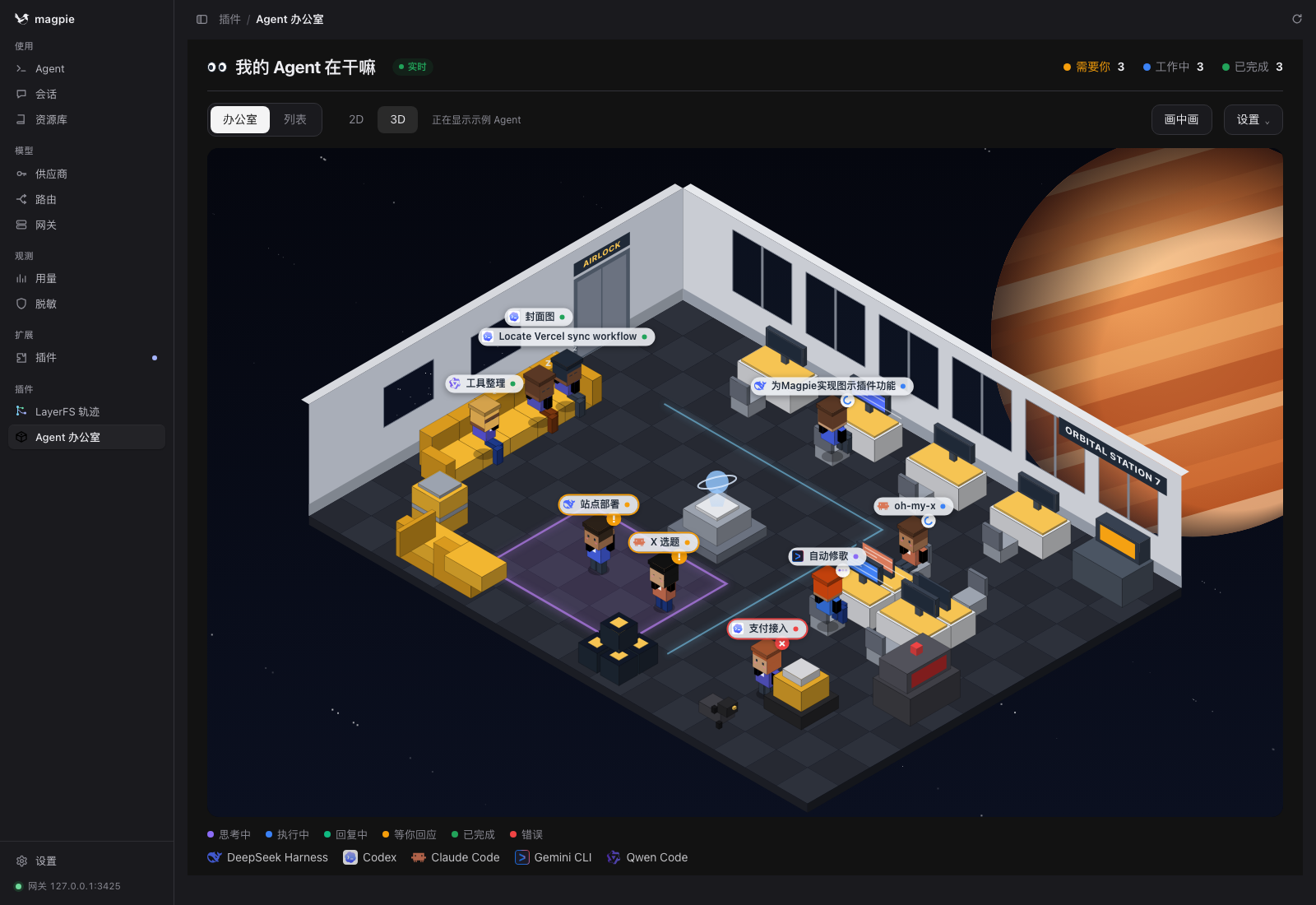
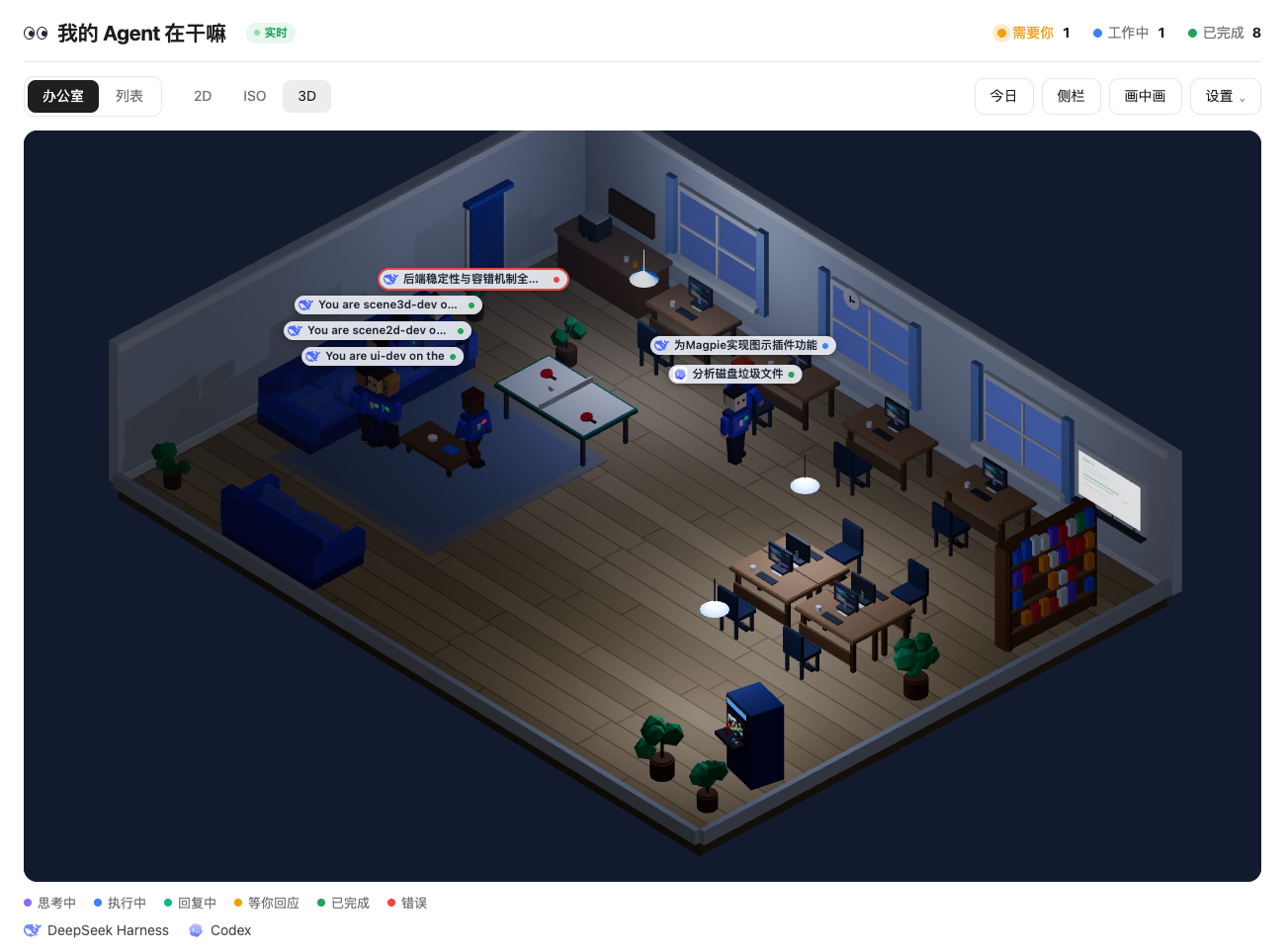
**一个住在 magpie 窗口里的实时 Agent 办公室。** 直接读取各 Agent 自己的会话记录,把正在思考、执行工具、等待批准或已经完成的工作,变成真 3D 办公室里的小人;也可以切到等距画布、俯视 2D 或分组列表。
|
||
|
||
A live activity dashboard for your coding agents inside [magpie](https://usemagpie.ai). Every session becomes a worker in a real WebGL office, an isometric canvas room, or a grouped workbench — driven by the agent's own session files, not guesses from network traffic.
|
||
|
||
|
||
|
||
|
||
|
||
## 快速开始 · Quick start
|
||
|
||
**magpie 插件(推荐)**
|
||
|
||
```sh
|
||
magpie plugin add @magpie-community/page-agent-office
|
||
```
|
||
|
||
安装后打开 **插件 › Agent 办公室**。第一次没有会话时会看到空办公室;想预览完整效果,可在 **设置 › 示例 Agent** 临时打开示例。
|
||
|
||
**独立运行(没有 magpie 时)**
|
||
|
||
```sh
|
||
bun bin/agent-office.mjs # 本地页面,默认 127.0.0.1:4545
|
||
bun bin/agent-office.mjs --json # 一次性快照,适合让 Agent 在聊天里汇报
|
||
```
|
||
|
||
独立服务会打印带随机访问令牌的完整 URL,请用该 URL 打开;固定的 `/live.js` 和数据 API 不公开。服务拒绝不匹配的 Host、跨站请求和缺少同源 Origin 的写入。端口占用时会报错,可用 `--port 0` 自动选择空闲端口。
|
||
|
||
仓库也带 `SKILL.md`,可放进 Claude Code / Codex 的 skills 目录,用 `/agent-office` 启动。
|
||
|
||
### 主要功能
|
||
|
||
- **真 3D(WebGL)**:等距相机、拖拽旋转、滚轮缩放、实时光照与阴影;办公室、空间站、咖啡店、城堡、海盗湾、幽灵谷六种程序化场景。
|
||
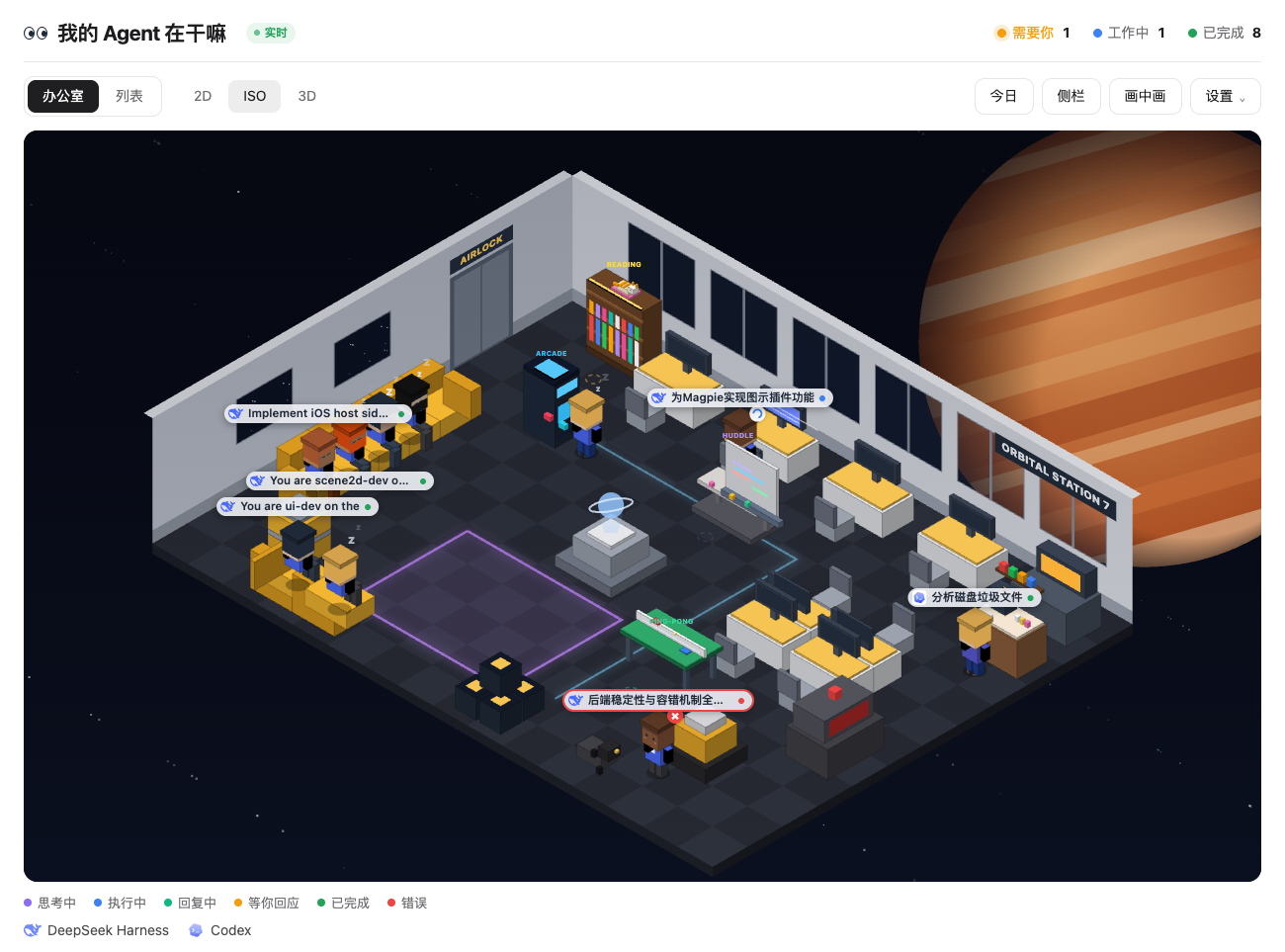
- **ISO / 2D**:不依赖 WebGL 的等距画布与俯视图;相机拖拽、滚轮缩放、昼夜窗光、办公室猫和五个活动点。
|
||
|
||
|
||
- **分组工作台**:按 **需要你 → 工作中 → 已结束** 分组;可按 Agent、子 Agent、摸鱼 Agent 过滤。
|
||
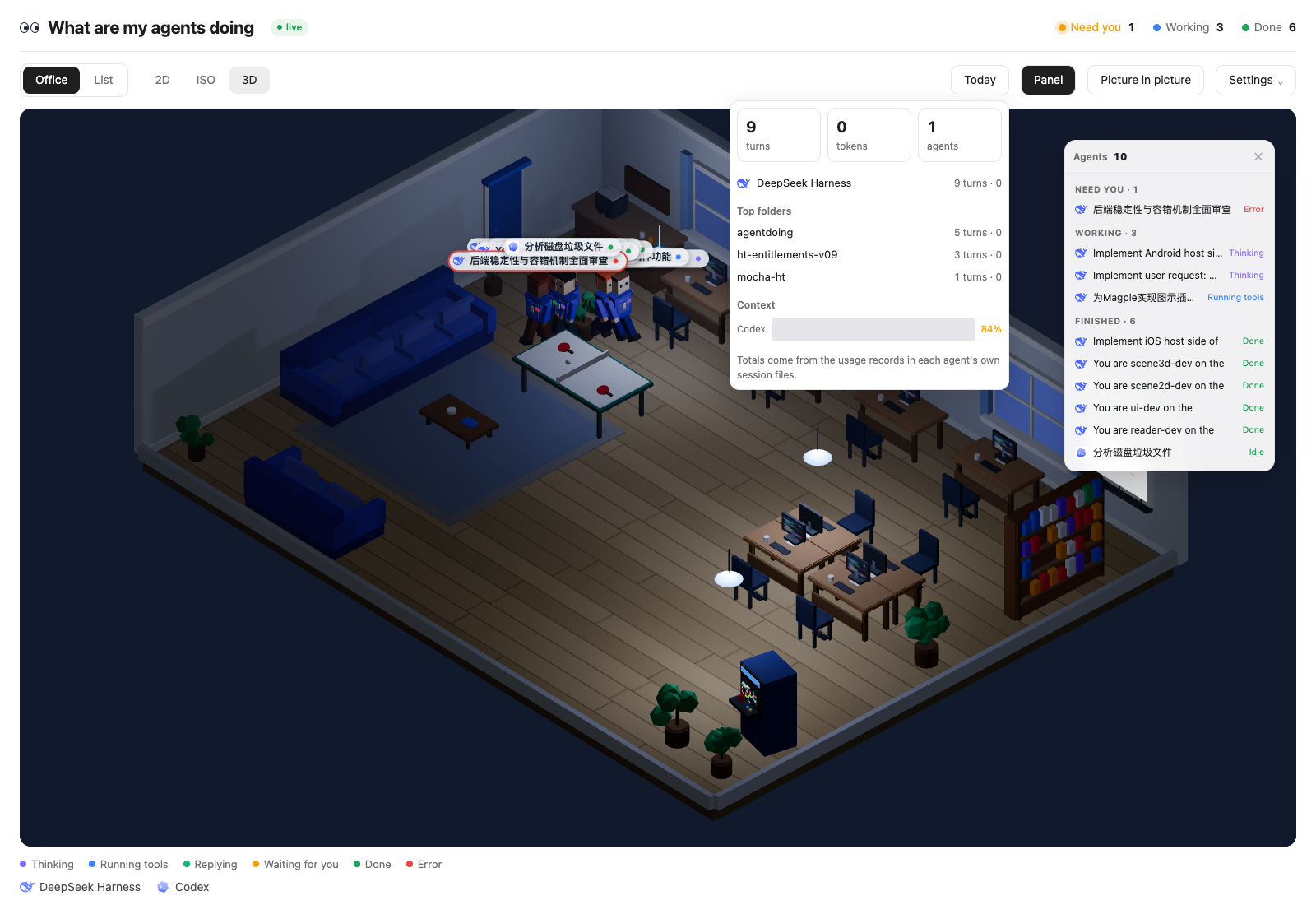
- **今日面板**:今天的轮次、tokens、按 Agent 与目录汇总,以及上下文使用率条(60% 黄、85% 红)。
|
||
|
||
|
||
- **最近对话**:点击 Agent 查看任务、当前步骤、最近消息、模型、目录、上下文和续接命令。
|
||
- **一键跳回终端**:在 macOS 上自动识别活跃会话所在的终端标签页、分屏或桌面窗口(Terminal.app、iTerm2、tmux、Herdr、Otty、Claude Desktop、Cursor、VS Code),支持面板点击(多宿主并排切换)或双击小人/名牌/列表行直接切回。
|
||
- **页内提醒**:新出现的「需要你」或错误会在页面右下角弹出提示;标题栏显示需要你的数量。magpie 的 iframe 没有系统通知权限,所以不调用浏览器通知。
|
||
- **9 种语言**:English、简体中文、繁體中文、日本語、한국어、Español、Français、Deutsch、Português。自动按最近提问的语言选择,也可手动指定。
|
||
- **画中画**:可拖动、可缩放的页内悬浮小窗,✕ 或 Esc 放回。
|
||
|
||
## 支持哪些 Agent
|
||
|
||
直接读取会话文件:
|
||
|
||
| Agent | 文件 |
|
||
|---|---|
|
||
| Claude Code | `~/.claude/projects/*/*.jsonl`(以及 `subagents/*.jsonl`;`sessions/*.json` 只用来判断进程是否还在) |
|
||
| Codex | `~/.codex/sessions/YYYY/MM/DD/rollout-*.jsonl`(+ `session_index.jsonl`) |
|
||
| Copilot CLI | `~/.copilot/session-state/*/events.jsonl` |
|
||
| Kimi Code | `~/.kimi-code/sessions/*/*/agents/*/wire.jsonl` |
|
||
| DeepSeek Harness | `~/.dsh/sessions/*/*/session.v4.jsonl[.zstd]` |
|
||
| Gemini CLI · Qwen Code | `~/.gemini/tmp/*/chats/session-*`, `~/.qwen/tmp/*/chats/session-*` |
|
||
| Pi · omp | `~/.pi/agent/sessions/*/*.jsonl`, `~/.omp/agent/sessions/*/*.jsonl`,以及 `~/.omp/profiles/*/agent/sessions` |
|
||
| Grok Build | `~/.grok/sessions/*/*/updates.jsonl` + `summary.json` |
|
||
| Qoder · WorkBuddy · CodeBuddy | 各自的 `projects/*/*.jsonl`(Claude Code 格式) |
|
||
|
||
`*_HOME` / `*_CONFIG_DIR` 覆盖变量都支持。Claude 子 Agent、Kimi 子 Agent、Grok 子 Agent 会标为子 Agent,并带父会话;OMP profiles 带 profile 名。其他 Agent(Cursor、OpenCode、Copilot 等)在通过 magpie 的模型工作时,仍会由异步网关钩子看到。
|
||
|
||
## 状态与办公室
|
||
|
||
| 状态 | 在哪里 | 标记 |
|
||
|---|---|---|
|
||
| Thinking · 思考中 | 工位 | … |
|
||
| Running tools · 执行中 | 工位,屏幕亮着 | 工具名、已运行时间 |
|
||
| Replying · 回复中 | 工位 | 正在写入的回复 |
|
||
| Waiting for you · 等你回应 | 紫色区域,挥手 | **!** |
|
||
| Done · 已完成 | 沙发、书架、咖啡台、乒乓球、街机、白板或电话亭 | ✓ / 摸鱼 |
|
||
| Error · 错误 | 故障终端 | × |
|
||
|
||
工作 8 分钟没有新动静标 **No progress**,工具运行 10 分钟标 **No progress · 10m**,仍留在「工作中」;20 分钟后的完成会话进入摸鱼状态。办公室有五个活动点、可撸的猫、随本地时间变化的窗光,以及可拖拽缩放的相机。
|
||
|
||
## 怎么知道
|
||
|
||
每个 Agent 自己写在本机的会话文件是唯一事实来源。host 每 1.5 秒读取变化,页面每秒加载一次 `page/live.js`:
|
||
|
||
- 工具有调用没结果 → **执行中**
|
||
- 请求批准 / 提问(Codex、DSH、Gemini、Kimi 等)→ **需要你**
|
||
- 本轮结束 → **完成**;中断 → **已结束**;错误 → **错误**
|
||
- 会话文件 8 / 10 分钟没动 → **No progress**
|
||
|
||
通过网关看到、没有本地文件的 Agent,按请求推断;它不会因为一次请求结束就冒充「完成」。hook 返回空 body,不修改任何请求。
|
||
|
||
**它会读取什么:** 本机的会话文件,包括提问、回复、工具命令、最近 8 条消息和用量字段,并在插件目录生成 `page/live.js`。设置里关闭「显示提问和回复」后只保留状态与工具名,不写入提问、回复、消息或命令参数;配置读不到时默认关闭文本(fail closed)。
|
||
|
||
## 隐私
|
||
|
||
- 只读本机 Agent 会话;默认只看最近两天、最多 40 个会话,CLI 可放到 200 个。
|
||
- `live.js` 保存在插件自己的目录,不发送到任何地方;页面 `permissions` 为空,不读 magpie 的会话 API。
|
||
- `text:false` 同时由 host 和页面执行:标题回退到目录名,步骤只留工具名,最近对话整段清空。即使 `live.js` 是旧的,页面也不会把被关闭的文本画出来。
|
||
- 独立 CLI 只监听 `127.0.0.1`;`--private` 与插件里的开关等价。
|
||
|
||
## 设置
|
||
|
||
```json
|
||
{
|
||
"mode": "office",
|
||
"dim": "3d",
|
||
"scene": "office",
|
||
"quality": "medium",
|
||
"demo": false,
|
||
"showDone": true,
|
||
"hideAfter": "6h",
|
||
"text": true,
|
||
"agents": [],
|
||
"showSub": true,
|
||
"showIdle": true,
|
||
"side": true,
|
||
"lang": "auto",
|
||
"remote": false
|
||
}
|
||
```
|
||
|
||
| Key | |
|
||
|---|---|
|
||
| `mode` | `office` 或 `list` |
|
||
| `dim` | `3d`(WebGL)、`iso`(等距画布)或 `2d`(俯视) |
|
||
| `scene` | `office`、`station`、`cafe`、`castle`、`pirate`、`graveyard` |
|
||
| `quality` | `low`、`medium`、`high`(3D 阴影与 DPR) |
|
||
| `showDone` | 保留已完成的 Agent |
|
||
| `hideAfter` | 完成后多久离开:`1h`、`6h`、`24h`、`never` |
|
||
| `text` | 保留提问、回复和最近对话(`false`:只留状态与工具名) |
|
||
| `agents` | 只显示这些 Agent;空数组为全部 |
|
||
| `showSub` / `showIdle` | 显示子 Agent / 摸鱼 Agent |
|
||
| `side` | 显示分组侧栏 |
|
||
| `lang` | `auto` 或九种语言代码 |
|
||
| `cleared` | { 会话 key: 时间 }:被「清除」的会话,文件再动就回来 |
|
||
| `remote` | 网关部分也记录其他电脑的请求 |
|
||
| `approvalAfterSec` | 只有网关记录时,工具运行多久算等你批准(90) |
|
||
|
||
## 独立 CLI
|
||
|
||
```sh
|
||
bun bin/agent-office.mjs [--port 4545] [--hours 48] [--private] [--json] [--no-open]
|
||
```
|
||
|
||
`--json` 输出与页面相同的快照,方便 Agent 在聊天里总结;不带 `--json` 时启动同一个页面,数据来自同一个扫描器。需要 Bun(DSH 的 zstd 解码用到 `Bun.zstdDecompressSync`)。
|
||
|
||
## What it cannot know
|
||
|
||
- **完全不读文件、也不经过 magpie 的 Agent**:没有任何记录。
|
||
- **逐 token 的模型进度**:会话文件按消息写入,回复中只表示文件在动。
|
||
- **系统通知**:magpie 的页面 iframe 没有通知权限,本插件用页内提示取代。
|
||
- **超过 40 个会话 / 两天**:默认不进入页面;CLI 可调大。
|
||
- **3D 需要 WebGL**:不可用时自动退回 ISO 画布,功能不丢。
|
||
|
||
## Files
|
||
|
||
- `lib/readers.mjs` — 各 Agent 会话格式转成状态、步骤、消息、用量;无 I/O。
|
||
- `lib/scan.mjs` — 找到会话文件,只重读变化;支持子 Agent、OMP profiles、DSH zstd 节流。
|
||
- `lib/track.mjs` — 网关请求 / 回复的推断;无 I/O。
|
||
- `office.hooks.mjs` — 插件 host:每 1.5 秒扫描、看网关请求、写 `page/live.js`。
|
||
- `page/model.js` — 状态、分组、过滤、Today、九语言、续接命令、隐私裁剪。
|
||
- `page/scene.js` — Canvas 等距 / 2D 办公室、五个活动点、猫、相机、昼夜。
|
||
- `page/scene3d.js`, `page/three.min.js` — WebGL 真 3D、六场景、光照阴影;three.js r169,MIT。
|
||
- `page/app.js`, `page/index.html`, `page/style.css`, `page/icons.js`, `page/icons/` — 页面、面板、侧栏、提醒和图标。
|
||
- `bin/agent-office.mjs`, `SKILL.md` — 没有 magpie 时的独立页面、`--json` 和 skill 包装。
|
||
|
||
## Test
|
||
|
||
```sh
|
||
bun test
|
||
```
|
||
|
||
167 项测试覆盖会话解析(含新客户端)、隐私、路径与朝向、沙发合成、2D 活动点、相机、昼夜、3D API、CLI 与独立服务。3D 回归测试执行随包 THREE 的真实场景、几何、动画和矩阵路径,仅替换 GPU 边界;另有真实 magpie 页面宿主的浏览器回归脚本 `test/browser.mjs`,覆盖 Retina 窄视口、菜单边界、标签碰撞、切换与关闭文本后的 DOM。
|
||
|
||
```sh
|
||
# 可选浏览器测试(另行安装 Playwright 与浏览器,先启动 magpie web)
|
||
OFFICE_PLAYWRIGHT=/path/to/playwright/index.mjs \
|
||
OFFICE_HOST_URL="http://127.0.0.1:4571/?k=YOUR_LOCAL_KEY" bun test/browser.mjs
|
||
```
|
||
|
||
在 macOS 15.7.9(24G830,arm64)、Playwright 1.56.1 的 WebKit 26.0(build 2215)上,测试的无协议数字主机 CSP 源会阻止脚本加载,补全 `http://` 后同一 sandbox 内可执行。维护者使用 Linux WebKit build 2336 未复现,因此这不是对所有 WebKit / Safari 的结论;原生 Safari / WKWebView 未自动化测试。受影响的 Mac 环境可显式设置 `OFFICE_NORMALIZE_WEBKIT_CSP=1`,仅规范化测试响应里的协议,保持原域名、目录白名单和 sandbox。可用 `OFFICE_PLAYWRIGHT=/path/to/playwright/index.mjs bun test/webkit-csp.mjs` 收集本机版本、实际 CSP 和控制台错误;详见 [后续验证](docs/follow-up-validation.md)。
|
||
|
||
JSONL 首次打开会重放一次,后续轮询保留字节偏移、UTF-8/JSON 分帧和各 reader 的解析状态,只解析追加的完整记录。截断、替换和同尺寸重写会重建状态;每次增长额外检查最多 128 字节的前缀/旧末尾,识别常见的两次轮询间截断再增长。未变化时不读取日志。metadata/usage sidecar 仅在其版本变化时重读;Codex 标题索引也采用追加游标。
|
||
|
||
可用合成数据复现实测(不会读取真实会话或调用模型):
|
||
|
||
```sh
|
||
bun scripts/bench-scan.mjs 100 1 # 一份 100 MiB 日志
|
||
bun scripts/bench-scan.mjs 100 4 # 四份并发日志
|
||
bun scripts/bench-scan.mjs 100 1 1 # 每 30 条文本后包含 1 MiB base64 图片
|
||
```
|
||
|
||
普通 JSONL 按追加日志处理;任意修改中部、同时保留 inode 与两处检查片段又增长的非追加编辑无法在不重读整个文件的前提下完整识别。初次读取或重建仍有 O(文件大小) 成本,但完整记录即使跨读取块也直接解析,只有 EOF 未完成的记录需要词法分帧。完整 JSON 文档、压缩 DSH 和发生变化的 usage sidecar 仍按各自快照格式读取。
|
||
|
||
修改页面资源后运行 `bun scripts/stamp-page.mjs` 更新内容指纹;`--check` 可验证没有旧指纹。画质切换调整像素比和阴影,抗锯齿在 WebGL 上下文创建时固定。人物使用 InstancedMesh 批量绘制,保留四肢动画与各 Agent 颜色。
|
||
|
||
## Prior art
|
||
|
||
The office metaphor and several interaction ideas were inspired by
|
||
[**whatsmyagentdoing**](https://github.com/Charonyuu/whatsmyagentdoing) by
|
||
[Charonyuu](https://github.com/Charonyuu) — a standalone Claude Code / Codex
|
||
skill that renders a live 3D office in the browser. It is an independent
|
||
project under the MIT license; this plugin is a magpie-native implementation
|
||
with its own renderer, session readers and privacy model. Thanks to its author
|
||
for showing how much life a small office can have.
|
||
|
||
## License
|
||
|
||
MIT. The bundled three.js is MIT; see the notice in `page/three.min.js` and
|
||
`page/scene3d.js`.
|