page-chat 0.1.3: smoother streaming, rename, width sync, English effort names (#498)
page-chat 0.1.3 (Magiczerowxy): streaming renders the settled blocks once and only the tail per frame; conversations can be renamed (PATCH /api/conversations/:id, title only, token-guarded); a Sync switch keeps the conversation and composer widths equal (composerWidth floor 35); effort names in English with xhigh; a draft row for a new conversation; a status line under each reply. An empty configDir now reads the library from the real config folder.

Reviewed at 7c0f68df74bef05ece6f037d574f0c50688c2bb8 (third round; the two earlier reviews' points were checked at this head).

Run on mote (macOS, Bun 1.4.2, Node 22, Playwright 1.62.0), sandbox HOME:
- packages/chat: bun test, 20 pass / 0 fail.
- Whole repo at the PR head: bun test 3284 pass / 8 skip / 0 fail; bun scripts/check.mjs ok.
- Whole repo at the PR head merged with origin/main fdc5002: bun test 3655 pass / 8 skip / 0 fail; bun scripts/check.mjs ok.
- Playwright probe, Chromium and WebKit, against lib/server.mjs with a fake gateway: a reply whose whole SSE arrives in one write, and one paced 30ms apart, both show "Hello there. / Second para." after the stream ends.

Broken by hand:
- finish()'s fallback put back to the old `.md-stable` check: the one-write reply shows "" in both engines (paced still fine).
- server.mjs `const dir = dirArg;` again: "an empty configDir reads the library from the real config folder" goes red (19 pass / 1 fail).

Earlier rounds (4d36cae, both engines): renaming the open conversation survives the next message; a token change reloads the page once; README edited on the original; LF line endings.

Not tried: inside the real magpie window (the probe loads the page from the package's own server).
This commit is contained in:
 Magiczerowxy
@@ -2,7 +2,7 @@
|
||||
|
||||
A chat page in [magpie](https://usemagpie.ai)'s window. Talk to magpie's own models with your MCP servers, instructions and skills, with images and LaTeX, without starting an agent.
|
||||
|
||||
Made by **Magic_zero** ([Magiczerowxy](https://github.com/Magiczerowxy)), from [Magiczerowxy/magpie-chat](https://github.com/Magiczerowxy/magpie-chat) (0.1.18). This package is that code, with the changes listed under [Changes from the original](#changes-from-the-original).
|
||||
Made by **Magic_zero** ([Magiczerowxy](https://github.com/Magiczerowxy)), from [Magiczerowxy/magpie-chat](https://github.com/Magiczerowxy/magpie-chat) (0.1.21). This package is that code, with the changes listed under [Changes from the original](#changes-from-the-original).
|
||||
|
||||
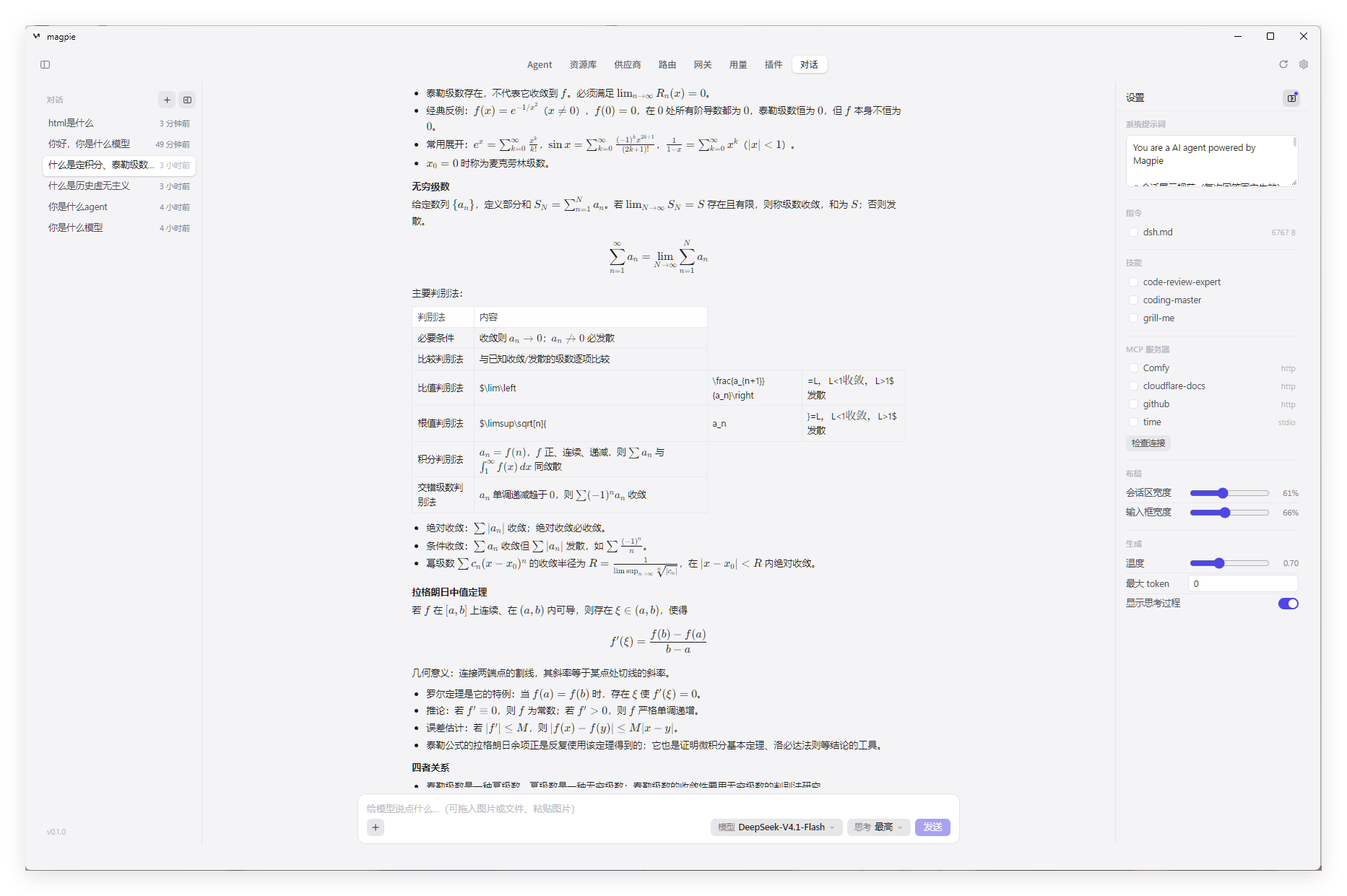
|
||||
|
||||
@@ -21,9 +21,11 @@ It then has a tab, **Chat** (对话, 對話, チャット), under Plugins in the
|
||||
- **magpie's models.** The list comes from the gateway's `/v1/models`. Models with reasoning levels get an effort picker.
|
||||
- **magpie's library.** Tick instructions and skills from `~/.config/magpie/library/` (folded into the system prompt), and MCP servers from `library.json` (their tools run as real `tool_calls`, at most 8 rounds, Streamable HTTP and stdio).
|
||||
- **Images and files.** Pick, drop or paste them. Images go to the model as `image_url`.
|
||||
- **Streaming.** Reasoning unfolds while it arrives, then collapses.
|
||||
- **Streaming.** Reasoning unfolds while it arrives, then collapses. While the answer streams, the page follows it down unless you scroll up yourself; scroll back to the bottom and it resumes.
|
||||
- **Model status.** Every reply ends with a line saying what the model is doing: `Magpie正在觅食ing… · 2s` with a running timer while it generates, green `Magpie找到了食物! · 2s` when done, red `Magpie没有找到食物` on failure. The elapsed time is kept with the conversation.
|
||||
- **Math.** `$…$`, `$$…$$`, `\(…\)` and `\[…\]` render with a bundled KaTeX 0.16.11. No CDN.
|
||||
- **Conversations kept**, pinned or deleted, under `~/.config/magpie/magpie-chat/`.
|
||||
- **Conversations kept**, pinned, renamed or deleted, under `~/.config/magpie/magpie-chat/`. Clicking "+" starts a draft row in the sidebar; it becomes a real conversation as soon as you send, and disappears if you switch away without writing anything. The pencil button on each row renames it inline.
|
||||
- **Layout.** Conversation width and composer width are adjustable in the sidebar; a **Sync** switch keeps the two equal — move either one and the other follows.
|
||||
- **Looks like magpie.** Colors and fonts come from the window's theme.
|
||||
|
||||
It registers no provider, asks for no sign-in and stores no credentials of its own. Every request goes out through magpie's gateway, so usage, routing and failover are the same as an agent's.
|
||||
|
||||
@@ -241,3 +241,67 @@ test("opened from another machine, the launcher takes magpie web's path, and exp
|
||||
// a magpie from before magpie.service: no navigation to a refused 127.0.0.1
|
||||
expect(await boot({ ready }, "server.lan")).toBe("")
|
||||
})
|
||||
|
||||
|
||||
// ---------- added in 0.1.3: renaming / layout sync / empty configDir ----------
|
||||
|
||||
test("renaming a conversation via PATCH keeps its messages", async () => {
|
||||
const h = { ...json, origin: "null", "x-magpie-chat-token": token }
|
||||
const saved = JSON.parse((await raw("POST", "/api/conversations", h, { title: "before", messages: [{ role: "user", content: "hi" }] })).body)
|
||||
const renamed = await raw("PATCH", "/api/conversations/" + saved.id, h, { title: "after" })
|
||||
expect(renamed.status).toBe(200)
|
||||
expect(JSON.parse(renamed.body).title).toBe("after")
|
||||
// the rename must not wipe messages: POST overwrites the whole file, PATCH only touches the title
|
||||
const got = JSON.parse((await raw("GET", "/api/conversations/" + saved.id, h)).body)
|
||||
expect(got.title).toBe("after")
|
||||
expect(got.messages.length).toBe(1)
|
||||
expect(got.messages[0].content).toBe("hi")
|
||||
})
|
||||
|
||||
test("renaming rejects an empty title, a missing conversation and a missing token", async () => {
|
||||
const h = { ...json, origin: "null", "x-magpie-chat-token": token }
|
||||
const saved = JSON.parse((await raw("POST", "/api/conversations", h, { title: "x", messages: [] })).body)
|
||||
expect((await raw("PATCH", "/api/conversations/" + saved.id, h, { title: " " })).status).toBe(400)
|
||||
expect((await raw("PATCH", "/api/conversations/c_does_not_exist", h, { title: "x" })).status).toBe(404)
|
||||
expect((await raw("PATCH", "/api/conversations/" + saved.id, { ...json, origin: "null" }, { title: "x" })).status).toBe(403)
|
||||
})
|
||||
|
||||
test("settings keep syncWidth and clamp composerWidth to 35", async () => {
|
||||
const h = { ...json, origin: "null", "x-magpie-chat-token": token }
|
||||
const saved = JSON.parse((await raw("POST", "/api/settings", h, { syncWidth: true, composerWidth: 10 })).body)
|
||||
expect(saved.syncWidth).toBe(true)
|
||||
expect(saved.composerWidth).toBe(35)
|
||||
const back = JSON.parse((await raw("GET", "/api/settings", h)).body)
|
||||
expect(back.syncWidth).toBe(true)
|
||||
expect(back.composerWidth).toBe(35)
|
||||
})
|
||||
|
||||
test("an empty configDir reads the library from the real config folder", async () => {
|
||||
mkdirSync(join(cfg, "library", "instructions"), { recursive: true })
|
||||
writeFileSync(join(cfg, "library", "instructions", "probe.md"), "be brief")
|
||||
const { startServer } = await import("./lib/server.mjs")
|
||||
const other = await startServer({ configDir: "", options: { port: 0 } })
|
||||
try {
|
||||
const got = await new Promise((resolve, reject) => {
|
||||
const req = request({
|
||||
host: "127.0.0.1",
|
||||
port: other.port,
|
||||
method: "GET",
|
||||
path: "/api/library",
|
||||
headers: { host: `127.0.0.1:${other.port}`, origin: "null", "x-magpie-chat-token": token }
|
||||
}, (res) => {
|
||||
let data = ""
|
||||
res.setEncoding("utf8")
|
||||
res.on("data", (c) => (data += c))
|
||||
res.on("end", () => resolve({ status: res.statusCode, body: data }))
|
||||
})
|
||||
req.on("error", reject)
|
||||
req.end()
|
||||
})
|
||||
expect(got.status).toBe(200)
|
||||
expect(JSON.parse(got.body).instructions.map((i) => i.name)).toContain("probe.md")
|
||||
} finally {
|
||||
await other?.close()
|
||||
}
|
||||
})
|
||||
|
||||
|
||||
+334
-18
@@ -269,6 +269,41 @@ function parseListBlock(lines, start) {
|
||||
return { node: root, next: i };
|
||||
}
|
||||
|
||||
/* 流式专用渲染:把正文切成"已经写完的块"和"正在写的尾巴"
|
||||
- 稳定块(最后一个空行之前)只在跨过块边界时重渲染一次,之后整块缓存不再动
|
||||
- 尾巴是纯文本,每帧只改 textContent —— 不再每帧清空重建整个 DOM
|
||||
以前的写法每帧 renderMarkdown 全量重建,文字节点被反复替换、排版反复重算,
|
||||
看上去就是一直抽搐。 */
|
||||
function renderStreaming(container, source) {
|
||||
var text = cleanText(source || "");
|
||||
var cut = text.lastIndexOf("\n\n");
|
||||
var stable = cut >= 0 ? text.slice(0, cut + 2) : "";
|
||||
var tail = cut >= 0 ? text.slice(cut + 2) : text;
|
||||
|
||||
var stableEl = container.firstChild && container.firstChild.classList && container.firstChild.classList.contains("md-stable")
|
||||
? container.firstChild : null;
|
||||
if (!stableEl) {
|
||||
while (container.firstChild) container.removeChild(container.firstChild);
|
||||
stableEl = el("div", { class: "md-stable" });
|
||||
container.appendChild(stableEl);
|
||||
container.appendChild(el("div", { class: "md-tail" }));
|
||||
container.dataset.stableLen = "-1";
|
||||
}
|
||||
var tailEl = container.lastChild;
|
||||
|
||||
if (container.dataset.stableLen !== String(stable.length)) {
|
||||
renderMarkdown(stableEl, stable);
|
||||
container.dataset.stableLen = String(stable.length);
|
||||
}
|
||||
// 只改尾巴里那个文本节点的值:不重建节点,光标(tail 里的 span)也就不会被删掉重建
|
||||
var tnode = tailEl.firstChild;
|
||||
if (!tnode || tnode.nodeType !== 3) {
|
||||
tnode = document.createTextNode("");
|
||||
tailEl.insertBefore(tnode, tailEl.firstChild);
|
||||
}
|
||||
if (tnode.nodeValue !== tail) tnode.nodeValue = tail;
|
||||
}
|
||||
|
||||
function renderMarkdown(container, source) {
|
||||
while (container.firstChild) container.removeChild(container.firstChild);
|
||||
var lines = cleanText(source).replace(/\r\n?/g, "\n").split("\n");
|
||||
@@ -453,6 +488,9 @@ function mathNode(tex, display) {
|
||||
|
||||
/* ================= 状态 ================= */
|
||||
|
||||
// 草稿对话的固定 id(不会出现在服务端,只在左侧列表里临时显示)
|
||||
var DRAFT_ID = "__draft__";
|
||||
|
||||
var state = {
|
||||
boot: null,
|
||||
settings: {
|
||||
@@ -464,6 +502,11 @@ var state = {
|
||||
conversations: [],
|
||||
messages: [],
|
||||
convId: null,
|
||||
// 点了"新对话"但还没发消息时,左侧先挂一条草稿;发出第一条就变成真对话,
|
||||
// 空着切走就直接丢掉,不在列表里留空壳。
|
||||
draft: null,
|
||||
// 流式输出时是否跟着往下滚。用户手动往上滑就变 false,滑回底部再变 true。
|
||||
follow: true,
|
||||
title: "新对话",
|
||||
busy: false,
|
||||
stopped: false,
|
||||
@@ -474,7 +517,9 @@ var state = {
|
||||
pop: ""
|
||||
};
|
||||
|
||||
var EFFORT_LABEL = { none: "不思考", minimal: "极低", low: "低", medium: "中", high: "高", max: "最高" };
|
||||
// 思考强度的显示名。key 是网关给的原始值(映射不动),只是显示成这些词。
|
||||
// 注意 xhigh:minimax / qwen 系列会用到,之前漏了会显示成原始串。
|
||||
var EFFORT_LABEL = { none: "None", minimal: "Minimal", low: "Low", medium: "Medium", high: "High", xhigh: "Xhigh", max: "Max" };
|
||||
function effortLabel(name) { return EFFORT_LABEL[name] || String(name); }
|
||||
|
||||
var toastTimer = null;
|
||||
@@ -489,7 +534,7 @@ function toast(text, isError) {
|
||||
|
||||
/* ================= HTTP ================= */
|
||||
|
||||
/* 服务给这个页面的口令(写在 HTML 的 meta 里),每个 /api/ 请求都带上:
|
||||
/* 服务给这个页面的口令(写在 HTML 的 meta 里),每个 api 请求都带上:
|
||||
别的页面也能发 Origin: null 的请求,口令才说明请求来自这个页面。 */
|
||||
var TOKEN = (function () {
|
||||
var m = document.querySelector('meta[name="magpie-chat-token"]');
|
||||
@@ -567,7 +612,9 @@ function streamChat(payload, onEvent, signal) {
|
||||
if (!res.ok) {
|
||||
return res.text().then(function (text) {
|
||||
var msg = text.slice(0, 300);
|
||||
try { var parsed = JSON.parse(text); msg = parsed.error || msg; reloadForToken(res, parsed); } catch (e) { /* 原样 */ }
|
||||
var parsed = null;
|
||||
try { parsed = JSON.parse(text); msg = parsed.error || msg; } catch (e) { /* 原样 */ }
|
||||
reloadForToken(res, parsed);
|
||||
throw new Error("请求失败:" + (msg || res.status));
|
||||
});
|
||||
}
|
||||
@@ -654,7 +701,8 @@ function applySettings(raw) {
|
||||
leftWidth: Number(s.leftWidth) || 0,
|
||||
rightWidth: Number(s.rightWidth) || 0,
|
||||
convWidth: Number(s.convWidth) || 72,
|
||||
composerWidth: Number(s.composerWidth) || 70
|
||||
composerWidth: Number(s.composerWidth) || 70,
|
||||
syncWidth: s.syncWidth === true
|
||||
};
|
||||
}
|
||||
|
||||
@@ -992,6 +1040,21 @@ function applyComposerWidth(pct) {
|
||||
document.documentElement.style.setProperty("--composer-w", v + "%");
|
||||
}
|
||||
|
||||
// "同步调整"打开时,拖动其中一条把另一条也拉到同一个值
|
||||
function syncWidthTo(from, v) {
|
||||
var n = Math.round(Number(v) || 0);
|
||||
// 两个都要记在 state 里:拖动过程中只改 DOM,等松手才 patchSettings,
|
||||
// 这里不记的话同步读到的是上一次的值。
|
||||
state.settings.convWidth = n;
|
||||
state.settings.composerWidth = n;
|
||||
applyConvWidth(n);
|
||||
applyComposerWidth(n);
|
||||
$("#convWidth").value = String(n);
|
||||
$("#composerWidth").value = String(n);
|
||||
$("#convWidthValue").textContent = n >= 100 ? "铺满" : n + "%";
|
||||
$("#composerWidthValue").textContent = n + "%";
|
||||
}
|
||||
|
||||
function clampWidth(side, v) {
|
||||
var w = WIDTHS[side];
|
||||
return Math.max(w.min, Math.min(w.max, Math.round(Number(v) || w.min)));
|
||||
@@ -1086,6 +1149,7 @@ function renderSettings() {
|
||||
$("#tempValue").textContent = Number(state.settings.temperature).toFixed(2);
|
||||
$("#maxTokens").value = String(state.settings.maxTokens || 0);
|
||||
$("#showReasoning").setAttribute("aria-checked", state.settings.showReasoning ? "true" : "false");
|
||||
$("#syncWidth").setAttribute("aria-checked", state.settings.syncWidth ? "true" : "false");
|
||||
renderSetList("#instructionList", state.library.instructions || [], "instructions", function (item) {
|
||||
return { key: item.id || item.name, name: item.name || item.id, extra: item.size ? item.size + " B" : "" };
|
||||
});
|
||||
@@ -1172,11 +1236,30 @@ function loadConversations() {
|
||||
function renderSessions() {
|
||||
var box = $("#sessionList");
|
||||
while (box.firstChild) box.removeChild(box.firstChild);
|
||||
if (!state.conversations.length) {
|
||||
|
||||
var items = state.conversations.slice();
|
||||
// 草稿(刚点"新对话"、还没发消息)排在最前,标题就叫"新对话"
|
||||
if (state.draft) items.unshift(state.draft);
|
||||
|
||||
if (!items.length) {
|
||||
box.appendChild(el("div", { class: "sess-empty", text: "还没有保存的对话" }));
|
||||
return;
|
||||
}
|
||||
state.conversations.forEach(function (item) {
|
||||
|
||||
items.forEach(function (item) {
|
||||
if (item.id === DRAFT_ID) {
|
||||
// 草稿:没写字时叫"新对话",一发送就把刚输入的内容当标题(没有置顶和删除)
|
||||
var dbtn = el("button", {
|
||||
class: "sess" + (state.convId ? "" : " on"),
|
||||
type: "button",
|
||||
title: item.title || "新对话"
|
||||
},
|
||||
el("span", { class: "sess-title", text: item.title || "新对话" }),
|
||||
el("span", { class: "sess-time", text: "刚刚" })
|
||||
);
|
||||
box.appendChild(dbtn);
|
||||
return;
|
||||
}
|
||||
var on = item.id === state.convId;
|
||||
var pinned = Boolean(item.pinned);
|
||||
|
||||
@@ -1190,11 +1273,16 @@ function renderSessions() {
|
||||
var delBtn = el("button", { class: "sess-act", type: "button", title: "删除", "aria-label": "删除" },
|
||||
el("span", { text: "\u00d7" }));
|
||||
|
||||
// 重命名:铅笔图标。按钮里塞不下 input(button 不能嵌交互元素),
|
||||
// 编辑时把这个条目整体换成一个输入框,提交/取消再换回来。
|
||||
var renameBtn = el("button", { class: "sess-act", type: "button", title: "重命名", "aria-label": "重命名" });
|
||||
renameBtn.innerHTML = '<svg viewBox="0 0 16 16" width="11" height="11" aria-hidden="true"><path d="M10.7 2.5a1.3 1.3 0 0 1 1.9 0l.9.9a1.3 1.3 0 0 1 0 1.9l-7.4 7.4-2.7.7.7-2.7z" fill="none" stroke="currentColor" stroke-width="1.3" stroke-linejoin="round"/></svg>';
|
||||
|
||||
var btn = el("button", { class: "sess" + (on ? " on" : ""), type: "button", title: item.title || "对话" },
|
||||
pinned ? el("span", { class: "sess-pin", text: "\u2605" }) : null,
|
||||
el("span", { class: "sess-title", text: item.title || "未命名" }),
|
||||
el("span", { class: "sess-time", text: relTime(item.updated) }),
|
||||
el("span", { class: "sess-acts" }, pinBtn, delBtn)
|
||||
el("span", { class: "sess-acts" }, pinBtn, renameBtn, delBtn)
|
||||
);
|
||||
// 条目本身是 <button>,里面的操作也是 <button>;点它们要拦住冒泡,别顺带打开对话
|
||||
pinBtn.addEventListener("click", function (ev) {
|
||||
@@ -1205,6 +1293,10 @@ function renderSessions() {
|
||||
ev.stopPropagation();
|
||||
askDelete(item.id, item.title);
|
||||
});
|
||||
renameBtn.addEventListener("click", function (ev) {
|
||||
ev.stopPropagation();
|
||||
startRename(item.id, btn, item.title || "未命名");
|
||||
});
|
||||
btn.addEventListener("click", function () { openConversation(item.id); });
|
||||
box.appendChild(btn);
|
||||
});
|
||||
@@ -1223,6 +1315,39 @@ function togglePin(id, pin) {
|
||||
.catch(function (err) { toast("置顶失败:" + err.message, true); });
|
||||
}
|
||||
|
||||
/* 重命名:把整个条目换成一个输入框,回车/失焦保存,Esc 取消 */
|
||||
function startRename(id, rowEl, oldTitle) {
|
||||
var input = el("input", { class: "sess-rename", type: "text", "aria-label": "重命名对话" });
|
||||
input.value = oldTitle || "";
|
||||
rowEl.parentNode.insertBefore(input, rowEl.nextSibling);
|
||||
rowEl.style.display = "none";
|
||||
input.focus();
|
||||
input.select();
|
||||
|
||||
var done = false;
|
||||
function finish(save) {
|
||||
if (done) return;
|
||||
done = true;
|
||||
var val = input.value.trim().replace(/\s+/g, " ");
|
||||
if (input.parentNode) input.parentNode.removeChild(input);
|
||||
rowEl.style.display = "";
|
||||
if (!save || !val || val === oldTitle) return;
|
||||
// 正在看的就是这一条:本地标题也要跟着改,否则下一次 persistConversation
|
||||
// 会把旧的 state.title 整份 POST 回去,刚改的名字又被盖掉。
|
||||
if (id === state.convId) state.title = val;
|
||||
api("api/conversations/" + encodeURIComponent(id), { method: "PATCH", body: { title: val } })
|
||||
.then(function () { return loadConversations(); })
|
||||
.catch(function (err) { toast("重命名失败:" + err.message, true); });
|
||||
}
|
||||
|
||||
input.addEventListener("keydown", function (e) {
|
||||
if (e.key === "Enter") { e.preventDefault(); finish(true); }
|
||||
else if (e.key === "Escape") { e.preventDefault(); finish(false); }
|
||||
});
|
||||
input.addEventListener("blur", function () { finish(true); });
|
||||
input.addEventListener("click", function (e) { e.stopPropagation(); });
|
||||
}
|
||||
|
||||
/* 删除:点了就删(不弹确认),删掉正在看的那条就回到空态 */
|
||||
function askDelete(id, title) {
|
||||
var name = String(title || "这条对话");
|
||||
@@ -1257,6 +1382,7 @@ function setSidebar(open) {
|
||||
|
||||
function openConversation(id) {
|
||||
if (state.busy) { toast("正在生成,先停止再切换对话", true); return; }
|
||||
dropBlankDraft(); // 切换到别的对话时,空着的"新对话"不该留在列表里
|
||||
api("api/conversations/" + encodeURIComponent(id)).then(function (conv) {
|
||||
if (!conv) return;
|
||||
state.convId = conv.id;
|
||||
@@ -1320,6 +1446,7 @@ function persistConversation() {
|
||||
if (!saved) return;
|
||||
state.convId = saved.id;
|
||||
state.title = saved.title || state.title;
|
||||
state.draft = null; // 已经是真对话了,草稿退场
|
||||
return loadConversations();
|
||||
}).catch(function (err) {
|
||||
toast("对话保存失败:" + err.message, true);
|
||||
@@ -1418,11 +1545,29 @@ function bindScrollBarDrag() {
|
||||
});
|
||||
}
|
||||
|
||||
// 距底部多少像素以内算"还在跟着看"
|
||||
var FOLLOW_GAP = 40;
|
||||
|
||||
function nearBottom(box) {
|
||||
if (!box) return true;
|
||||
return box.scrollHeight - box.scrollTop - box.clientHeight <= FOLLOW_GAP;
|
||||
}
|
||||
|
||||
// force=true:无条件回到底部并恢复跟随(发消息、切对话时用)
|
||||
// force=false:只有"还在跟随"时才滚。用户自己往上滑过就不再拽回来。
|
||||
function scrollBottom(force) {
|
||||
var box = $("#stream");
|
||||
if (!box) return;
|
||||
var near = box.scrollHeight - box.scrollTop - box.clientHeight < 110;
|
||||
if (force || near) box.scrollTop = box.scrollHeight;
|
||||
if (force) {
|
||||
state.follow = true;
|
||||
box.scrollTop = box.scrollHeight;
|
||||
return;
|
||||
}
|
||||
if (state.follow === false) return;
|
||||
// 这里不要再判 nearBottom:流式输出每帧都在长高,"距底"天然会变大,
|
||||
// 实时判会把"正是自己在往下写"误判成"用户滚走了",于是永远不跟。
|
||||
// follow 状态由 scroll / wheel / touchmove 那三个监听维护。
|
||||
box.scrollTop = box.scrollHeight;
|
||||
}
|
||||
|
||||
function renderMessages() {
|
||||
@@ -1508,8 +1653,8 @@ function lightbox(src, name) {
|
||||
document.body.appendChild(box);
|
||||
}
|
||||
|
||||
function buildTurn(msg) {
|
||||
var root = el("div", { class: "turn " + msg.role });
|
||||
function buildTurn(msg, animate) {
|
||||
var root = el("div", { class: "turn " + msg.role + (animate ? " enter" : "") });
|
||||
var name = turnLabelFor(msg);
|
||||
var icon = modelIconFor(msg);
|
||||
var label = el("span", { class: "turn-label" });
|
||||
@@ -1714,6 +1859,90 @@ function scheduleMarkdown(refs) {
|
||||
});
|
||||
}
|
||||
|
||||
/* ---------- 流式"打字机":把一次收到的一大块按帧均匀放出来 ----------
|
||||
网关的 delta 经常是一句话甚至一段一起到,直接渲染就是一格一格跳。
|
||||
这里先把内容压进 msg.pending,每帧只放几个字,文字就是连续流出来的。 */
|
||||
var pumpRaf = 0;
|
||||
var pumpQueue = new Set();
|
||||
|
||||
function pumpKick() {
|
||||
if (!pumpRaf) pumpRaf = requestAnimationFrame(pumpTick);
|
||||
}
|
||||
|
||||
function pumpTick() {
|
||||
pumpRaf = 0;
|
||||
var live = false;
|
||||
var now = (typeof performance !== "undefined" ? performance.now() : Date.now());
|
||||
pumpQueue.forEach(function (refs) {
|
||||
var msg = refs.msg;
|
||||
var pend = msg.pending || "";
|
||||
if (!pend) return;
|
||||
live = true;
|
||||
|
||||
// 分两种情况:
|
||||
// 流式:网关一个字一个字给,积压一直很小 → 匀速走,手感最稳。
|
||||
// 非流式:某些模型一次把整段吐出来,积压一下几百上千字 →
|
||||
// 按"剩余时间"倒推每帧该放多少,保证 1 秒内流完。
|
||||
var take;
|
||||
// 进了"大块模式"就一直按进度走,直到这段文字放完 ——
|
||||
// 不能等积压掉到 120 以下就切回慢速,那样最后一百多字会被拖成好几秒。
|
||||
if (pend.length > 120 || msg.burstMode) {
|
||||
if (!msg.burstMode) {
|
||||
msg.burstMode = true;
|
||||
// 从"收到第一段文字"那一刻开始计时,而不是从第一次渲染算 ——
|
||||
// 中间隔着建 DOM、等 rAF 的时间,从渲染算会整体晚一拍。
|
||||
msg.burstStart = msg.streamStartedAt || now;
|
||||
msg.burstTotal = msg.content.length + pend.length;
|
||||
}
|
||||
// 按时间线性推进:progress 是已过的时间比例,target 是该显示到第几个字。
|
||||
// 不看帧率,30fps 还是 120fps,1 秒到的瞬间都正好放完。
|
||||
var progress = Math.min(1, (now - msg.burstStart) / 1000);
|
||||
var target = Math.ceil(msg.burstTotal * progress);
|
||||
take = Math.max(3, target - msg.content.length);
|
||||
} else {
|
||||
// 真正的流式:匀速,手感最稳
|
||||
take = pend.length > 80 ? 6 : 3;
|
||||
}
|
||||
take = Math.min(pend.length, Math.max(3, take));
|
||||
msg.content += pend.slice(0, take);
|
||||
msg.pending = pend.slice(take);
|
||||
renderStreaming(refs.body, msg.content);
|
||||
// 光标复用同一个元素,只在第一次挂上去(每帧删了重建同样会造成 DOM 抖动)
|
||||
if (!refs.caret) refs.caret = el("span", { class: "streaming-caret" });
|
||||
var tailEl = refs.body.lastChild;
|
||||
if (tailEl && refs.caret.parentNode !== tailEl) tailEl.appendChild(refs.caret);
|
||||
if (!msg.pending) {
|
||||
// 必须把光标元素从 DOM 里摘掉。只把 refs.caret 置 null 的话,
|
||||
// 最后那一帧 append 上去的 span 会一直留在正文末尾 ——
|
||||
// 就是那个 6×12、背景是主题色的紫色小方块。
|
||||
if (refs.caret && refs.caret.parentNode) refs.caret.parentNode.removeChild(refs.caret);
|
||||
refs.caret = null;
|
||||
pumpQueue.delete(refs);
|
||||
msg.burstMode = false; // 这段放完了,下一轮重新判断是流式还是一次性
|
||||
msg.burstStart = 0;
|
||||
msg.burstTotal = 0;
|
||||
}
|
||||
});
|
||||
if (live) scrollBottom(false);
|
||||
if (pumpQueue.size) pumpRaf = requestAnimationFrame(pumpTick);
|
||||
}
|
||||
|
||||
// 这一轮结束了:把还没放完的一次性倒出来,别让结尾缺字
|
||||
function pumpFlush(refs) {
|
||||
var msg = refs && refs.msg;
|
||||
if (!msg) return;
|
||||
if (msg.pending) {
|
||||
msg.content += msg.pending;
|
||||
msg.pending = "";
|
||||
}
|
||||
msg.burstMode = false;
|
||||
msg.burstStart = 0;
|
||||
msg.burstTotal = 0;
|
||||
pumpQueue.delete(refs);
|
||||
if (refs.caret && refs.caret.parentNode) refs.caret.parentNode.removeChild(refs.caret);
|
||||
refs.caret = null;
|
||||
}
|
||||
|
||||
/* ================= 发送 / 停止 ================= */
|
||||
|
||||
function autoGrow() {
|
||||
@@ -1746,19 +1975,31 @@ function send() {
|
||||
renderAttachments();
|
||||
var asstMsg = {
|
||||
role: "assistant", content: "", reasoning: "", toolCalls: [],
|
||||
usage: null, ms: 0, error: "", model: state.settings.model, stopped: false
|
||||
usage: null, ms: 0, error: "", model: state.settings.model, stopped: false,
|
||||
// 这一轮第一次收到文字的时刻,用来判断"一次性输出"时该用多快的流速
|
||||
streamStartedAt: 0,
|
||||
// 是否正处于"一次给一大段"的加速播放状态
|
||||
burstMode: false
|
||||
};
|
||||
state.messages.push(userMsg, asstMsg);
|
||||
|
||||
if (!state.convId && state.title === "新对话") {
|
||||
state.title = text.replace(/\s+/g, " ").slice(0, 30);
|
||||
}
|
||||
// 草稿发了第一条消息:先把列表里那条的标题换成刚输入的内容(不用等服务器),
|
||||
// 等保存成功再把它换成真正的对话条目(见 persistConversation)。
|
||||
if (state.draft) {
|
||||
state.draft.title = state.title;
|
||||
state.draft.updated = Date.now();
|
||||
renderSessions();
|
||||
}
|
||||
|
||||
var box = $("#stream");
|
||||
var empty = box.querySelector(".empty-state");
|
||||
if (empty) box.removeChild(empty);
|
||||
box.appendChild(buildTurn(userMsg).root);
|
||||
var refs = buildTurn(asstMsg);
|
||||
// 刚发出的两条消息带动画(从下往上冒 + 渐显);重新打开对话时不动
|
||||
box.appendChild(buildTurn(userMsg, true).root);
|
||||
var refs = buildTurn(asstMsg, true);
|
||||
box.appendChild(refs.root);
|
||||
|
||||
input.value = "";
|
||||
@@ -1845,8 +2086,11 @@ function handleEvent(evt, refs) {
|
||||
}
|
||||
break;
|
||||
case "delta":
|
||||
msg.content += evt.text || "";
|
||||
scheduleMarkdown(refs);
|
||||
// 先攒着,交给打字机队列按帧放,文字才是连续流出来的
|
||||
if (!msg.streamStartedAt) msg.streamStartedAt = (typeof performance !== "undefined" ? performance.now() : Date.now());
|
||||
msg.pending = (msg.pending || "") + (evt.text || "");
|
||||
pumpQueue.add(refs);
|
||||
pumpKick();
|
||||
break;
|
||||
case "tool":
|
||||
handleTool(evt, refs);
|
||||
@@ -1989,8 +2233,16 @@ function finish(refs) {
|
||||
state.busy = false;
|
||||
state.abort = null;
|
||||
state.stopped = false;
|
||||
// 先把打字机队列里剩下的倒完,再收尾(否则最后一段可能没上屏)
|
||||
pumpFlush(refs);
|
||||
if (refs.caret && refs.caret.parentNode) refs.caret.parentNode.removeChild(refs.caret);
|
||||
refs.caret = null;
|
||||
// 保险:把这条消息里所有流式光标都清掉,别在正文末尾留个小色块
|
||||
if (refs.body) {
|
||||
refs.body.querySelectorAll(".streaming-caret").forEach(function (node) {
|
||||
if (node.parentNode) node.parentNode.removeChild(node);
|
||||
});
|
||||
}
|
||||
refs.think.dataset.live = "0";
|
||||
// 输出完就自动收起思考过程;用户自己展开过就尊重他的选择
|
||||
if (!refs.think.hidden && !refs.think.dataset.user && refs.think.open) {
|
||||
@@ -1998,6 +2250,9 @@ function finish(refs) {
|
||||
refs.think.open = false;
|
||||
}
|
||||
if (refs.dirty) { refs.dirty = false; renderMarkdown(refs.body, refs.msg.content); }
|
||||
// 整段一次到达时,流会在一帧内结束:那次 pumpTick 一次都没跑过,dirty 还是 false,
|
||||
// 也没有 .md-stable 结构,正文就一直是空的。所以只要 finish 时有内容就渲染一次。
|
||||
else if (refs.body && refs.msg.content) renderMarkdown(refs.body, refs.msg.content);
|
||||
state.liveRefs.delete(refs);
|
||||
updateMeta(refs);
|
||||
updateSend();
|
||||
@@ -2024,8 +2279,16 @@ function stop() {
|
||||
|
||||
/* ================= 事件绑定 ================= */
|
||||
|
||||
// 现在是不是停在一个"刚点新建、还没写任何东西"的空白对话里
|
||||
function isBlankDraft() {
|
||||
return Boolean(state.draft) && !state.convId && !state.messages.length;
|
||||
}
|
||||
|
||||
function newChat() {
|
||||
if (state.busy) { toast("正在生成,先停止再新建对话", true); return; }
|
||||
// 已经在一个空白的新对话里了:再点"新对话"就保持原样,别叠出第二个
|
||||
if (isBlankDraft()) { $("#input").focus(); return; }
|
||||
state.draft = { id: DRAFT_ID, title: "新对话", updated: Date.now() };
|
||||
state.convId = null;
|
||||
state.title = "新对话";
|
||||
state.messages = [];
|
||||
@@ -2034,6 +2297,15 @@ function newChat() {
|
||||
$("#input").focus();
|
||||
}
|
||||
|
||||
// 离开草稿:如果它一个字都没写,就从列表里丢掉
|
||||
function dropBlankDraft() {
|
||||
if (state.draft && !state.messages.length) {
|
||||
state.draft = null;
|
||||
return true;
|
||||
}
|
||||
return false;
|
||||
}
|
||||
|
||||
function bindUI() {
|
||||
var input = $("#input");
|
||||
|
||||
@@ -2060,6 +2332,22 @@ function bindUI() {
|
||||
|
||||
// 滚动条:滚时浮现,停手淡出;可拖动
|
||||
$("#stream").addEventListener("scroll", flashScrollBar, { passive: true });
|
||||
|
||||
// 流式跟随:用户往上滑就停止跟随(不然每帧都被拽回底部,根本没法往回看);
|
||||
// 滑回底部附近再自动恢复。
|
||||
$("#stream").addEventListener("scroll", function () {
|
||||
var box = $("#stream");
|
||||
state.follow = nearBottom(box);
|
||||
}, { passive: true });
|
||||
|
||||
// 滚轮/触摸是最直接的"用户想往上翻"的意图,比 scroll 事件更早也更准
|
||||
$("#stream").addEventListener("wheel", function (e) {
|
||||
if (e.deltaY < 0) state.follow = false;
|
||||
else if (nearBottom($("#stream"))) state.follow = true;
|
||||
}, { passive: true });
|
||||
$("#stream").addEventListener("touchmove", function () {
|
||||
if (!nearBottom($("#stream"))) state.follow = false;
|
||||
}, { passive: true });
|
||||
bindScrollBarDrag();
|
||||
window.addEventListener("resize", paintScrollBar);
|
||||
|
||||
@@ -2074,21 +2362,49 @@ function bindUI() {
|
||||
});
|
||||
|
||||
// 会话区 / 输入框宽度:拖动时立刻生效,松手才写盘
|
||||
// 两个宽度滑条:开了"同步调整"就一起走
|
||||
$("#convWidth").addEventListener("input", function (e) {
|
||||
var v = Number(e.target.value);
|
||||
state.settings.convWidth = v;
|
||||
applyConvWidth(v);
|
||||
$("#convWidthValue").textContent = v >= 100 ? "铺满" : v + "%";
|
||||
if (state.settings.syncWidth) syncWidthTo("conv", v);
|
||||
});
|
||||
$("#convWidth").addEventListener("change", function (e) {
|
||||
patchSettings({ convWidth: Number(e.target.value) });
|
||||
var v = Number(e.target.value);
|
||||
patchSettings(state.settings.syncWidth ? { convWidth: v, composerWidth: v } : { convWidth: v });
|
||||
});
|
||||
$("#composerWidth").addEventListener("input", function (e) {
|
||||
var v = Number(e.target.value);
|
||||
state.settings.composerWidth = v;
|
||||
applyComposerWidth(v);
|
||||
$("#composerWidthValue").textContent = v + "%";
|
||||
if (state.settings.syncWidth) syncWidthTo("composer", v);
|
||||
});
|
||||
$("#composerWidth").addEventListener("change", function (e) {
|
||||
patchSettings({ composerWidth: Number(e.target.value) });
|
||||
var v = Number(e.target.value);
|
||||
patchSettings(state.settings.syncWidth ? { convWidth: v, composerWidth: v } : { composerWidth: v });
|
||||
});
|
||||
|
||||
// 开关:打开时先把两个宽度统一成较小的那个
|
||||
$("#syncWidth").addEventListener("click", function () {
|
||||
var on = !state.settings.syncWidth;
|
||||
state.settings.syncWidth = on;
|
||||
$("#syncWidth").setAttribute("aria-checked", on ? "true" : "false");
|
||||
if (on) {
|
||||
var v = Math.min(Number(state.settings.convWidth) || 72, Number(state.settings.composerWidth) || 70);
|
||||
state.settings.convWidth = v;
|
||||
state.settings.composerWidth = v;
|
||||
applyConvWidth(v);
|
||||
applyComposerWidth(v);
|
||||
$("#convWidth").value = String(v);
|
||||
$("#composerWidth").value = String(v);
|
||||
$("#convWidthValue").textContent = v >= 100 ? "铺满" : v + "%";
|
||||
$("#composerWidthValue").textContent = v + "%";
|
||||
patchSettings({ syncWidth: true, convWidth: v, composerWidth: v });
|
||||
} else {
|
||||
patchSettings({ syncWidth: false });
|
||||
}
|
||||
});
|
||||
|
||||
$("#maxTokens").addEventListener("change", function (e) {
|
||||
|
||||
@@ -120,10 +120,16 @@
|
||||
</div>
|
||||
<div class="set-row">
|
||||
<span class="set-label">输入框宽度</span>
|
||||
<input class="range" id="composerWidth" type="range" min="40" max="100" step="1" value="70"
|
||||
<input class="range" id="composerWidth" type="range" min="35" max="100" step="1" value="70"
|
||||
aria-label="输入框宽度" title="拖动调整输入框相对会话区的宽度">
|
||||
<output class="set-val" id="composerWidthValue">70%</output>
|
||||
</div>
|
||||
<div class="set-row">
|
||||
<span class="set-label">同步调整</span>
|
||||
<button class="switch" id="syncWidth" type="button" role="switch" aria-checked="false" aria-label="同步调整">
|
||||
<span class="switch-thumb"></span>
|
||||
</button>
|
||||
</div>
|
||||
</div>
|
||||
|
||||
<div class="set-sec">
|
||||
|
||||
@@ -283,6 +283,21 @@ input, textarea { font: inherit; color: inherit; }
|
||||
color: var(--muted);
|
||||
}
|
||||
.sess-act:hover { background: color-mix(in srgb, var(--fg) 10%, transparent); color: var(--fg); }
|
||||
/* 重命名时临时替换条目用的输入框 */
|
||||
.sess-rename {
|
||||
display: block;
|
||||
width: 100%;
|
||||
height: 28px;
|
||||
padding: 0 8px;
|
||||
border: 1px solid var(--accent);
|
||||
border-radius: 7px;
|
||||
background: var(--card);
|
||||
color: var(--fg);
|
||||
font: inherit;
|
||||
font-size: 12.5px;
|
||||
outline: none;
|
||||
box-sizing: border-box;
|
||||
}
|
||||
.sess-act.pinned { color: var(--accent); }
|
||||
.sess-pin {
|
||||
flex: none;
|
||||
@@ -378,6 +393,13 @@ input, textarea { font: inherit; color: inherit; }
|
||||
.chev { display: inline-flex; flex: none; color: var(--faint); }
|
||||
.pill:hover .chev, .pill.on .chev { color: var(--muted); }
|
||||
|
||||
/* 思考强度:档位都很短,不需要跟模型列表一样宽 */
|
||||
#effortPop {
|
||||
width: max-content;
|
||||
min-width: 104px;
|
||||
max-width: 160px;
|
||||
}
|
||||
|
||||
/* ---------- popover(仿 magpie .pop) ---------- */
|
||||
.pop {
|
||||
position: absolute;
|
||||
@@ -661,6 +683,29 @@ input, textarea { font: inherit; color: inherit; }
|
||||
padding: 12px 0 14px;
|
||||
}
|
||||
|
||||
/* 流式渲染的两段结构:已写完的块(.md-stable)+ 正在写的尾巴(.md-tail)。
|
||||
尾巴是纯文本,保留换行;两者拼接处不留多余空档。 */
|
||||
.turn-body.md .md-stable > :last-child { margin-bottom: 0; }
|
||||
.turn-body.md .md-stable:empty { display: none; }
|
||||
.turn-body.md .md-tail {
|
||||
white-space: pre-wrap;
|
||||
overflow-wrap: anywhere;
|
||||
}
|
||||
.turn-body.md .md-tail:empty { display: none; }
|
||||
|
||||
/* 新消息入场:从下面冒上来 + 渐显。
|
||||
只给刚发出的消息加 .enter,重新打开对话时历史消息不动。 */
|
||||
@keyframes turn-in {
|
||||
from { opacity: 0; transform: translateY(34px); }
|
||||
to { opacity: 1; transform: translateY(0); }
|
||||
}
|
||||
.turn.enter {
|
||||
animation: turn-in .42s cubic-bezier(.16, .84, .34, 1) both;
|
||||
}
|
||||
@media (prefers-reduced-motion: reduce) {
|
||||
.turn.enter { animation: none; }
|
||||
}
|
||||
|
||||
.turn + .turn { border-top: 1px solid var(--line-2); }
|
||||
|
||||
.turn-who { display: flex; align-items: center; gap: 7px; min-height: 16px; }
|
||||
@@ -800,8 +845,14 @@ input, textarea { font: inherit; color: inherit; }
|
||||
height: 12px;
|
||||
margin-left: 2px;
|
||||
vertical-align: -2px;
|
||||
border-radius: 1.5px;
|
||||
background: var(--accent);
|
||||
animation: blink 1s steps(2, start) infinite;
|
||||
/* 柔和呼吸而不是硬闪:和文字流出的节奏更搭 */
|
||||
animation: caret-breathe 1.1s ease-in-out infinite;
|
||||
}
|
||||
@keyframes caret-breathe {
|
||||
0%, 100% { opacity: 1; }
|
||||
50% { opacity: .22; }
|
||||
}
|
||||
|
||||
@keyframes blink { 0%, 50% { opacity: 1; } 50.01%, 100% { opacity: 0; } }
|
||||
@@ -925,8 +976,10 @@ input, textarea { font: inherit; color: inherit; }
|
||||
width: var(--composer-w, 70%);
|
||||
max-width: 100%;
|
||||
margin: 0 auto;
|
||||
/* 必须是 border-box:content-box 时 width:100% 还要再加左右各几十像素的 padding,
|
||||
整条输入框会溢出 .main,直接压到右侧设置栏下面。 */
|
||||
box-sizing: border-box;
|
||||
padding: 8px clamp(20px, 5vw, 72px) 0;
|
||||
box-sizing: content-box;
|
||||
}
|
||||
|
||||
/* 让 field 的底边就是页面底边,只留一点点视觉呼吸(贴住但不切字) */
|
||||
|
||||
@@ -81,6 +81,7 @@ const DEFAULTS = {
|
||||
rightWidth: 0, // 设置栏宽度(0 = 用默认值)
|
||||
convWidth: 72, // 会话内容列宽度(%),100 = 铺满
|
||||
composerWidth: 70, // 输入框宽度(%)
|
||||
syncWidth: false, // 布局里的"同步调整":打开后两个宽度始终一致
|
||||
};
|
||||
|
||||
function cleanSettings(raw) {
|
||||
@@ -101,7 +102,8 @@ function cleanSettings(raw) {
|
||||
leftWidth: Number.isFinite(Number(s.leftWidth)) ? Math.max(0, Math.min(420, Number(s.leftWidth))) : 0,
|
||||
rightWidth: Number.isFinite(Number(s.rightWidth)) ? Math.max(0, Math.min(560, Number(s.rightWidth))) : 0,
|
||||
convWidth: Number.isFinite(Number(s.convWidth)) ? Math.max(0, Math.min(100, Number(s.convWidth))) : 72,
|
||||
composerWidth: Number.isFinite(Number(s.composerWidth)) ? Math.max(40, Math.min(100, Number(s.composerWidth))) : 70,
|
||||
composerWidth: Number.isFinite(Number(s.composerWidth)) ? Math.max(35, Math.min(100, Number(s.composerWidth))) : 70,
|
||||
syncWidth: s.syncWidth === true,
|
||||
};
|
||||
}
|
||||
|
||||
@@ -232,7 +234,7 @@ function corsHeaders(req) {
|
||||
return {
|
||||
"access-control-allow-origin": allow,
|
||||
"access-control-allow-headers": "content-type, " + TOKEN_HEADER,
|
||||
"access-control-allow-methods": "GET,POST,DELETE,OPTIONS",
|
||||
"access-control-allow-methods": "GET,POST,PATCH,DELETE,OPTIONS",
|
||||
vary: "Origin",
|
||||
};
|
||||
}
|
||||
@@ -534,8 +536,12 @@ async function runChat({ res, body, settings, store }, controllers) {
|
||||
}
|
||||
}
|
||||
|
||||
export async function startServer({ configDir: dir, options = {} } = {}) {
|
||||
const store = createStore(dir || configDir());
|
||||
export async function startServer({ configDir: dirArg, options = {} } = {}) {
|
||||
// 调用方常传 configDir: "";libraryView(dir = configDir()) 的默认值只在参数是
|
||||
// undefined 时生效,空字符串会让 join("", "library") 变成相对路径,指令 / 技能 /
|
||||
// MCP 全读不到。这里统一兜成真实目录。
|
||||
const dir = dirArg || configDir();
|
||||
const store = createStore(dir);
|
||||
const controllers = new Map();
|
||||
// 0 也是合法的(让系统挑一个空闲端口,测试用)
|
||||
const want = options.port ?? process.env.MAGPIE_CHAT_PORT;
|
||||
@@ -692,6 +698,19 @@ export async function startServer({ configDir: dir, options = {} } = {}) {
|
||||
await store.removeConversation(conv[1]);
|
||||
return send(res, 200, { ok: true });
|
||||
}
|
||||
// 只改标题:/api/conversations 的 POST 是整份覆盖(messages 也会被清空),
|
||||
// 所以重命名单独走 PATCH。
|
||||
if (conv && req.method === "PATCH") {
|
||||
const body = await readBody(req);
|
||||
const c = await store.getConversation(conv[1]);
|
||||
if (!c) return send(res, 404, { error: "没有这个对话" });
|
||||
const title = String(body.title || "").trim().replace(/\s+/g, " ").slice(0, 90);
|
||||
if (!title) return send(res, 400, { error: "标题不能为空" });
|
||||
c.title = title;
|
||||
c.updated = Date.now();
|
||||
await writeFile(store.convPath(conv[1]), JSON.stringify(c));
|
||||
return send(res, 200, { id: c.id, title: c.title, updated: c.updated });
|
||||
}
|
||||
if (path === "/api/chat" && req.method === "POST") {
|
||||
const body = await readBody(req);
|
||||
const settings = await store.settings();
|
||||
|
||||
@@ -1,6 +1,6 @@
|
||||
{
|
||||
"name": "@magpie-community/page-chat",
|
||||
"version": "0.1.2",
|
||||
"version": "0.1.3",
|
||||
"description": "在 magpie 窗口里加一个「对话」页面:用 magpie 自己的模型、MCP 服务器、指令和技能聊天,支持图片与 LaTeX。A chat page inside magpie's window: talk with magpie's own models, MCP servers, instructions and skills, with images and LaTeX.",
|
||||
"author": "Magic_zero (https://github.com/Magiczerowxy)",
|
||||
"files": [
|
||||
|
||||
Reference in New Issue
Block a user