 yetone
b38ad66551
ferock on Discord, after page-chat updated itself to 0.1.7: typing a
system prompt said "保存失败:Failed to fetch", and every message after
failed the same way. The system prompt wasn't the cause. Nothing was
listening on the page's port any more.

magpie swaps plugin hosts when a plugin is updated, installed or set
(Restart, or another magpie's change to plugins.json). An old host that
is still finishing a call (a reply, a tool call) keeps running, up to 10
minutes, and its page service keeps 3477. The new host's service tried
for 6s, threw "3477 一直被占用", and never tried again. When the old
host left, nobody had the port. The page's frame stayed on
127.0.0.1:3477, and every fetch failed until magpie was restarted.

startServer now tries for those 6s (bindTries x 500ms) without holding
up the host. Then it goes on trying once a second in the background
until the port is free, and stops when the service is closed. The page's
next request gets 403 with the new token, and the page reloads itself
as before. index.mjs logs "listening" when the port is bound.

Run (mote):
- Reproduced with real magpie serve (magpie origin/main 36af588e2) in a
  sandbox HOME, page-chat on port 3592. A plugin tool that takes 40s was
  in flight while page-chat 0.1.6 was auto-updated to 0.1.7 by
  KeepUpdated, or while another plugin was added. 0.1.7's service logged
  "could not start: 3592 一直被占用", and every save to /api/settings got
  000 (no listener) after the old host left, even with a fresh token.
  With this change the same run logs "还被占着" and then "listening".
  A save gets 403 (new token), and the page's reload saves 200.
- Without a busy host, an update came back on its own (403, reload). So
  did saves of Chinese, quoted, multi-line and 50k-char system prompts
  and a chat on 0.1.7. None of them failed.
- bun test chat.test.mjs: 31 pass. The two new tests are red on the old
  lib ("58585 一直被占用,服务起不来"), checked by hand.
- bun scripts/check.mjs ok.

Not tried: magpie's desktop window (WebKit). The page there was not
driven; its 403 reload path is unchanged.
8.6 KiB
@magpie-community/page-chat
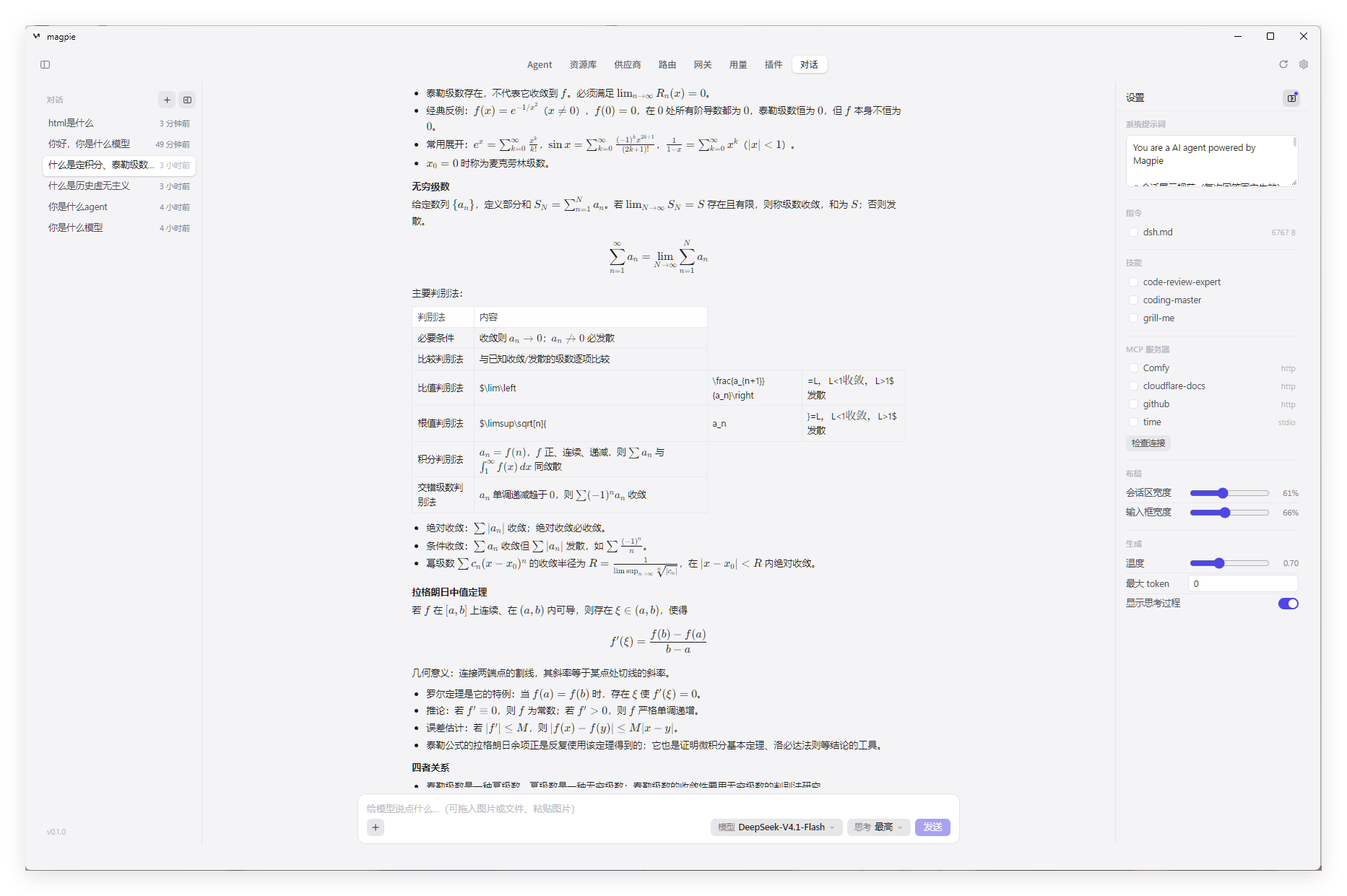
A chat page in magpie's window. Talk to magpie's own models with your MCP servers, instructions and skills, with images and LaTeX, without starting an agent.
Made by Magic_zero (Magiczerowxy), from Magiczerowxy/magpie-chat (0.1.21). This package is that code, with the changes listed under Changes from the original.
Install
From magpie's Plugins › Discover, or:
magpie plugin add @magpie-community/page-chat
It then has a tab, Chat (对话, 對話, チャット), under Plugins in the sidebar.
What it does
- magpie's models. The list comes from the gateway's
/v1/models. Models with reasoning levels get an effort picker. Each model shows its brand icon (OpenAI, Claude, Gemini, DeepSeek, Qwen, Kimi, GLM, MiniMax and more) in the picker and next to its name in the transcript. The icons come from @lobehub/icons (MIT); seechat/icons/models/NOTICE. - magpie's library. Tick instructions and skills from
~/.config/magpie/library/(folded into the system prompt), and MCP servers fromlibrary.json(their tools run as realtool_calls, at most 8 rounds, Streamable HTTP and stdio). The switch "使用 magpie 的全部 MCP 服务器" at the top of the MCP list uses every server in the library instead, one added to magpie later too; it is off by default, and turning it off brings back the servers you ticked. magpie's own MCP servers (web search, image recognition, image generation, plugin tools) are in the list beside the library's while they are on in magpie (asked of the gateway's/v1/magpie/mcp, magpie v0.1.2397 and later; an older magpie lists none); one turned off in magpie's Settings is left out, and a library server of the same name, such as an installedmagpie-image, is used in its place. - Images and files. Pick, drop or paste them. Images go to the model as
image_url. Replies can carry base64 data-URI images, which render inline and open full size on click. Remoteimages are shown as a link instead of being loaded — fetching them automatically would let a reply make the page request an arbitrary URL. - Streaming. Reasoning unfolds while it arrives, then collapses. While the answer streams, the page follows it down unless you scroll up yourself; scroll back to the bottom and it resumes.
- Model status. Every reply ends with a line saying what the model is doing:
Magpie正在觅食ing… · 2swith a running timer while it generates, greenMagpie找到了食物! · 2swhen done, redMagpie没有找到食物on failure. The elapsed time is kept with the conversation. - Math.
$…$,$$…$$,\(…\)and\[…\]render with a bundled KaTeX 0.16.11. No CDN. - Conversations kept, pinned, renamed or deleted, under
~/.config/magpie/magpie-chat/. Clicking "+" starts a draft row in the sidebar; it becomes a real conversation as soon as you send, and disappears if you switch away without writing anything. The pencil button on each row renames it inline. - Layout. Conversation width and composer width are adjustable in the sidebar; a Sync switch keeps the two equal — move either one and the other follows.
- System prompt switch. The text you write under 系统提示词 can be turned off without deleting it; ticked instructions and skills still apply.
- Looks like magpie. Colors and fonts come from the window's theme.
It registers no provider, asks for no sign-in and stores no credentials of its own. Every request goes out through magpie's gateway, so usage, routing and failover are the same as an agent's.
How it works
A plugin page runs in a sandboxed frame with no network (connect-src 'none'). Its only way out is to navigate itself. So this plugin has two parts:
page/index.htmlandpage/boot.js: a launcher magpie hosts. It reads the window's theme and theportoption through_magpie/bridge.js, then sends its frame tohttp://127.0.0.1:<port>/. It makes no request of its own.index.mjs: an OpenCode v1 plugin (export default {id, server}). When magpie's plugin host callsserver(), it starts a local service on127.0.0.1:3477(theportoption).lib/server.mjsserves the chat UI inchat/and/api/*, and forwards chat to magpie's gateway.
What the service reads and sends
- From magpie's config folder (
$XDG_CONFIG_HOME/magpieor~/.config/magpie):caller-keys.json(the first gateway key, sent asAuthorization: Bearerto the gateway, so the chat's usage is counted on that key),providers.jsonandrouting.json(icons),settings.json(fonts, and the gatewayportwhen the build writes one there),library.jsonandlibrary/(MCP servers, instructions, skills). - To magpie's gateway:
MAGPIE_CHAT_GATEWAYif set, elseMAGPIE_ADDR, else theportfrom magpie'ssettings.json(the portable build writes its real port there, e.g.18086), elsehttp://127.0.0.1:3425. The key goes there, so setMAGPIE_CHAT_GATEWAYonly to a gateway you trust. - To your MCP servers: what the model asks their tools, with the headers you configured for them. A stdio server's command is run as you configured it. magpie's own MCP servers are on the gateway, and get the gateway key.
Who can use the service
Only the chat page it served:
- Every
/api/route needsx-magpie-chat-token, a random token made each time the service starts. The service writes it into the chat page's HTML, which it sends without CORS headers, so another page can't read it./api/ping,/api/fonts.cssand/api/icon/*are open; they give nothing secret. Hostmust be127.0.0.1:<port>orlocalhost:<port>, so a DNS-rebound page is turned away.Originmust benull(the sandboxed frame) or the service's own.
Options
{ "port": 3477 }
The launcher and the service both read it. Change it if something else holds 3477.
When magpie swaps plugin hosts (a plugin updated, installed or set) while the old host is still finishing a call, the old host's service keeps the port until that call ends. The new host's service waits for it, trying again every second, and takes the port once it is free. The open page's next request then gets a new token and the page reloads itself.
Starting it without magpie's host
serve.mjs (node serve.mjs, or start-server.cmd / start-server.vbs on Windows) starts the same service on its own, and install-autostart.cmd puts it in Windows' Startup folder. See SERVE.md. None of these runs unless you start it.
Changes from the original
- The service answered
Origin: nulland requests with no Origin, and didn't checkHost. Any website's sandboxed iframe sendsOrigin: null, so it could chat on your gateway key, read and change conversations and settings, and drive your MCP tools. A DNS-rebound page could read conversations. The token and the Host check above close it. - The service started when
index.mjswas imported, on 3477 whatever theportoption said, while the launcher went to the option's port. It now starts when the host callsserver(), on the option's port. - A remote provider icon answered 302 with no
Location. It has one. /api/bootstrapsaid version0.1.0whatever the version. It says the package's.
Known limits
- The page opens the service on this computer's 127.0.0.1, so
magpie webused from another machine won't reach it. - MCP has no legacy GET SSE stream and no reconnect.
- Images go inline as base64, at most 24MB each.
- Built-in provider icons live inside magpie's binary; when one can't be read, the service draws a letter badge.
Test
bun test packages/chat
The test starts the service on a free port against a fake gateway, in a temporary config folder.
License
MIT, © 2026 Magiczerowxy. See LICENSE.
中文:Magic_zero(Magiczerowxy)做的「对话」页面,来自 Magiczerowxy/magpie-chat。装好后侧栏「插件」里点「对话」,就能用 magpie 自己的模型聊天,带上你的 MCP 服务器、指令和技能,支持图片与 LaTeX。它不注册供应商、不保存凭据,请求都经 magpie 网关发出,用的是 caller-keys.json 里第一把网关 key。本地服务只听 127.0.0.1,每个 /api/ 请求都要带上服务写进对话页里的口令,并检查 Host,别的网页用不了它。