 QingJ
1e04c1d324
A new community page plugin by QingJ01: Agent Office, a page in magpie's window that shows each local agent session as a worker in an office (3D/2D) or a list, with status, current step and a resume command.

- Its host part (office.hooks.mjs, an async gateway hook) reads the session files of Claude Code, Codex, dsh, Gemini CLI, Qwen Code, Pi, omp, Qoder, WorkBuddy and CodeBuddy every 1.5 s and writes page/live.js beside the page. It opens no socket and sends nothing off the machine. The page makes no magpie.read calls and loads only its own files.
- Text switch: with text off, the host writes no prompt, reply, error or tool argument (the title falls back to the folder, the step to the tool name), and the page redacts whatever live.js holds.
- Options are read at module load from plugins.json in the host's cwd (magpie's config folder), with the XDG path as a fallback. npm specs are matched with @tag/@version stripped, a path spec by realpath against the package's own folder. It fails closed: text stays off until an install's options or a request's ctx.options turn it on.
- The disclosure (package description, registry summary, root README) says which session files it reads. magpie's install sheet still says "reads nothing" for such a page (yetone/magpie#4187).

Run at the reviewed head e76d1a3, on mote:
- bun test in packages/agent-office: 44 pass, 0 fail.
- The whole repo at origin/main 3462544 merged with e76d1a3: bun test 3275 pass, 8 skip, 0 fail (HOME sandboxed); bun scripts/check.mjs exit 0.
- The new privacy tests run against 9230da7's hooks: 5 of 11 red (@latest, @0.1.0, cwd-only config, no config, unmatched spec).
- e76d1a3's case (cwd plugins.json without this entry, XDG plugins.json with text:true), by hand: text stays off. With d4acdae's hooks: text on and the prompt leaks. No test covers this case. The privacy tests stay green with it reverted.
- Real magpie: main 0745db932, built for macOS with -tags nogui, run as a portable magpie (.portable marker) in a sandbox HOME. The plugin was added from a folder named zz-src, so no name guess can match. A decoy ~/.config/magpie/plugins.json said text:true. The sandbox HOME had a seeded Claude Code session with a secret prompt, reply and Bash argument. magpie web was driven in Playwright Chromium and WebKit (WebKit in zh). With text on, the prompt, reply and command showed. With text off, the page hid them within 0.3 s. live.js went text:false after the host restarted, and over 30 s of sampling no secret was on the page or in live.js. After a reload, the switch was off and nothing leaked. The frame requested only its own files under /_magpie/plugin/<token>/, with no request leaving 127.0.0.1:3592. The plugin host had no sockets (lsof).

Not changed: the XDG fallback can read another magpie's plugins.json, but only when the host's cwd has none. magpie starts the host in its own config folder, which always has one, so a real host never reaches it.
Agent Office · 我的 Agent 在干嘛




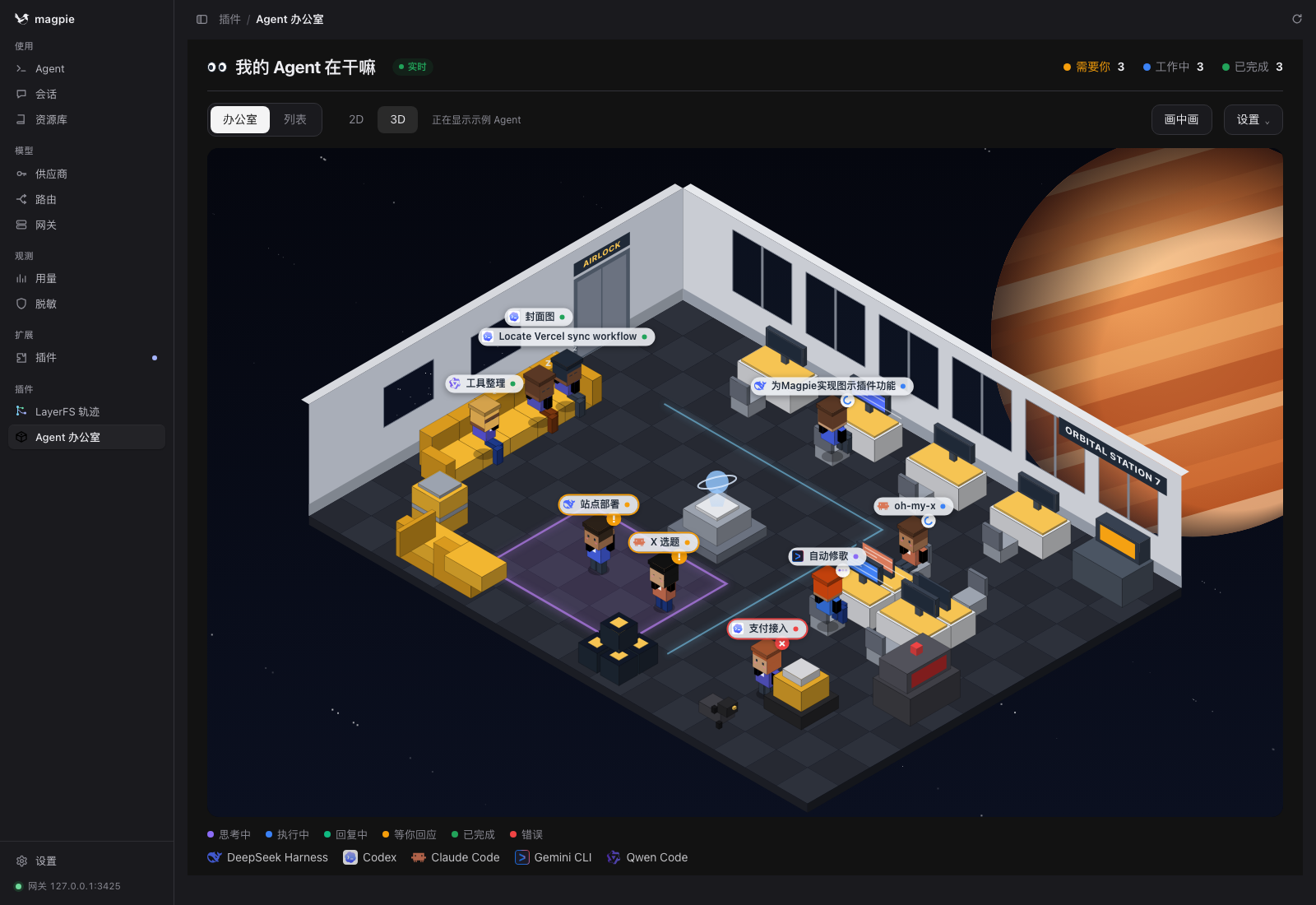
一个住在 magpie 窗口里的实时 Agent 办公室。 直接读取各 Agent 自己的会话记录,把正在思考、执行工具、等待批准或已经完成的工作,变成太空站里的小人。支持等距 3D、俯视 2D、实时列表和可拖动的悬浮小窗。
A live activity dashboard for your coding agents inside magpie: every session becomes a little worker in a voxel space-station office, driven by the agent's own session files rather than guesses from network traffic.
快速开始 · Quick start
magpie plugin add @magpie-community/page-agent-office
安装后打开 插件 › Agent 办公室。默认显示真实会话,不是演示数据;第一次没有会话时会看到空办公室。想预览完整效果,可在 设置 › 示例 Agent 临时打开示例。
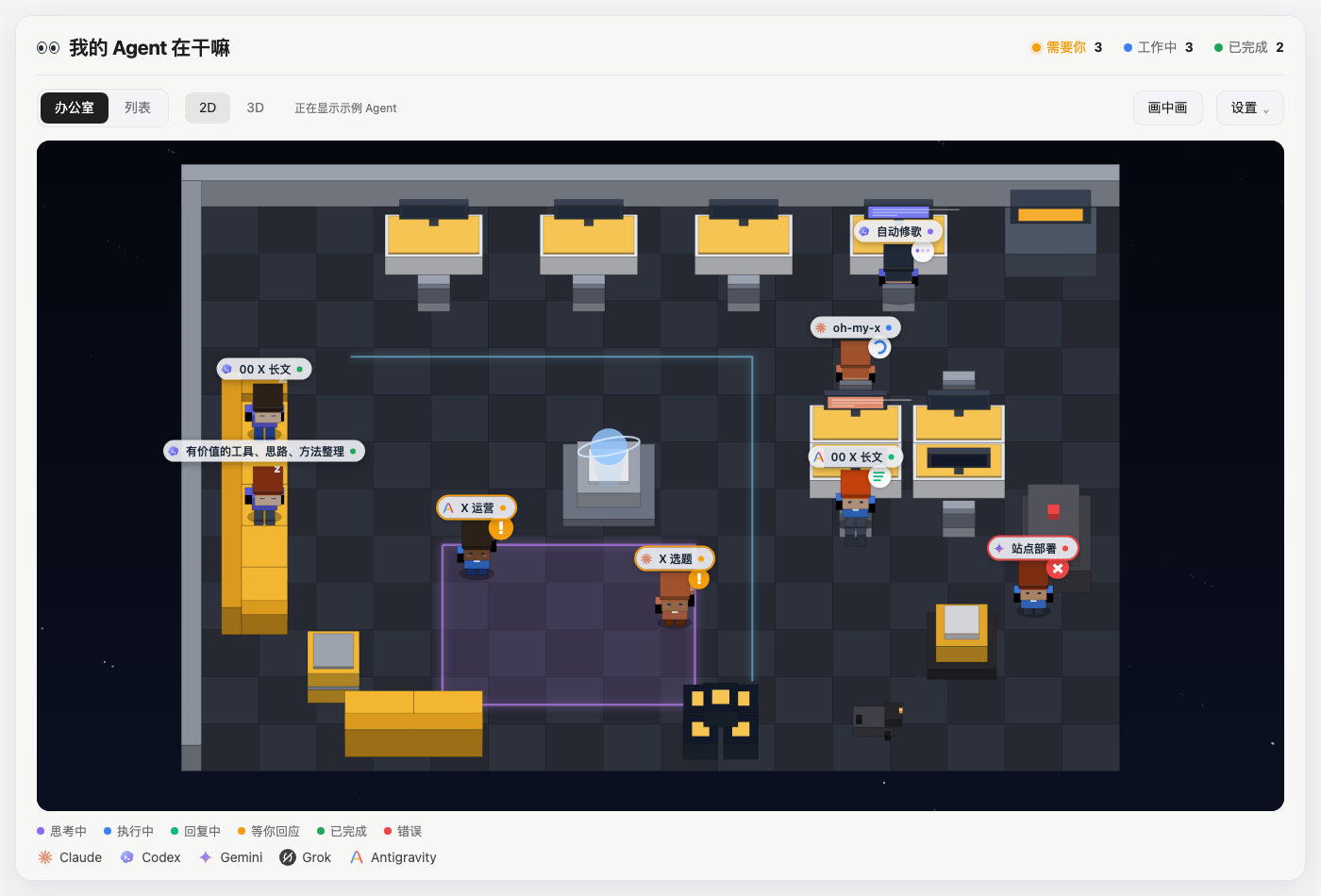
- 3D / 2D:等距太空站或俯视图。
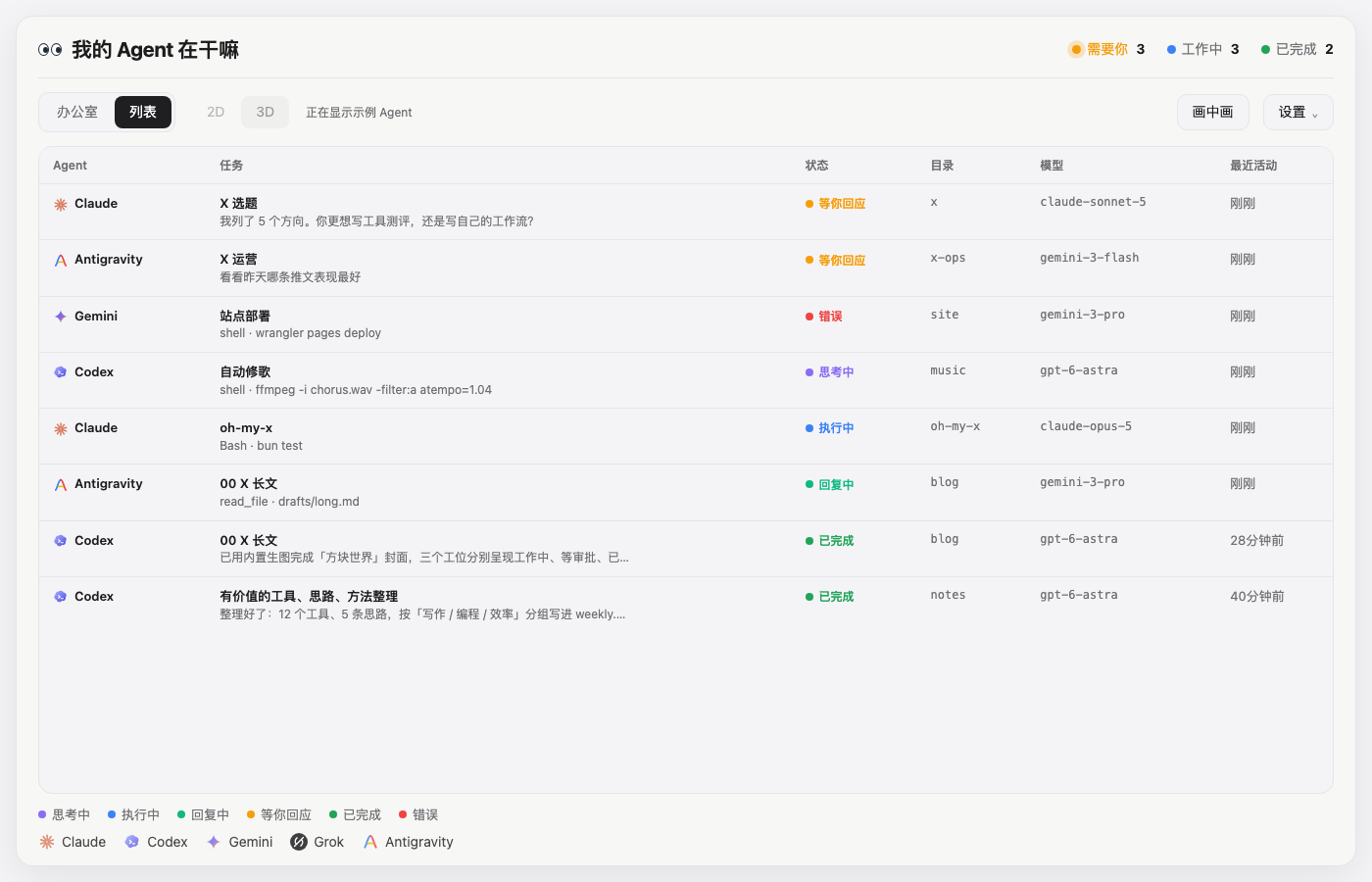
- 办公室 / 列表:实时状态、当前步骤、目录、模型和最近活动时间。
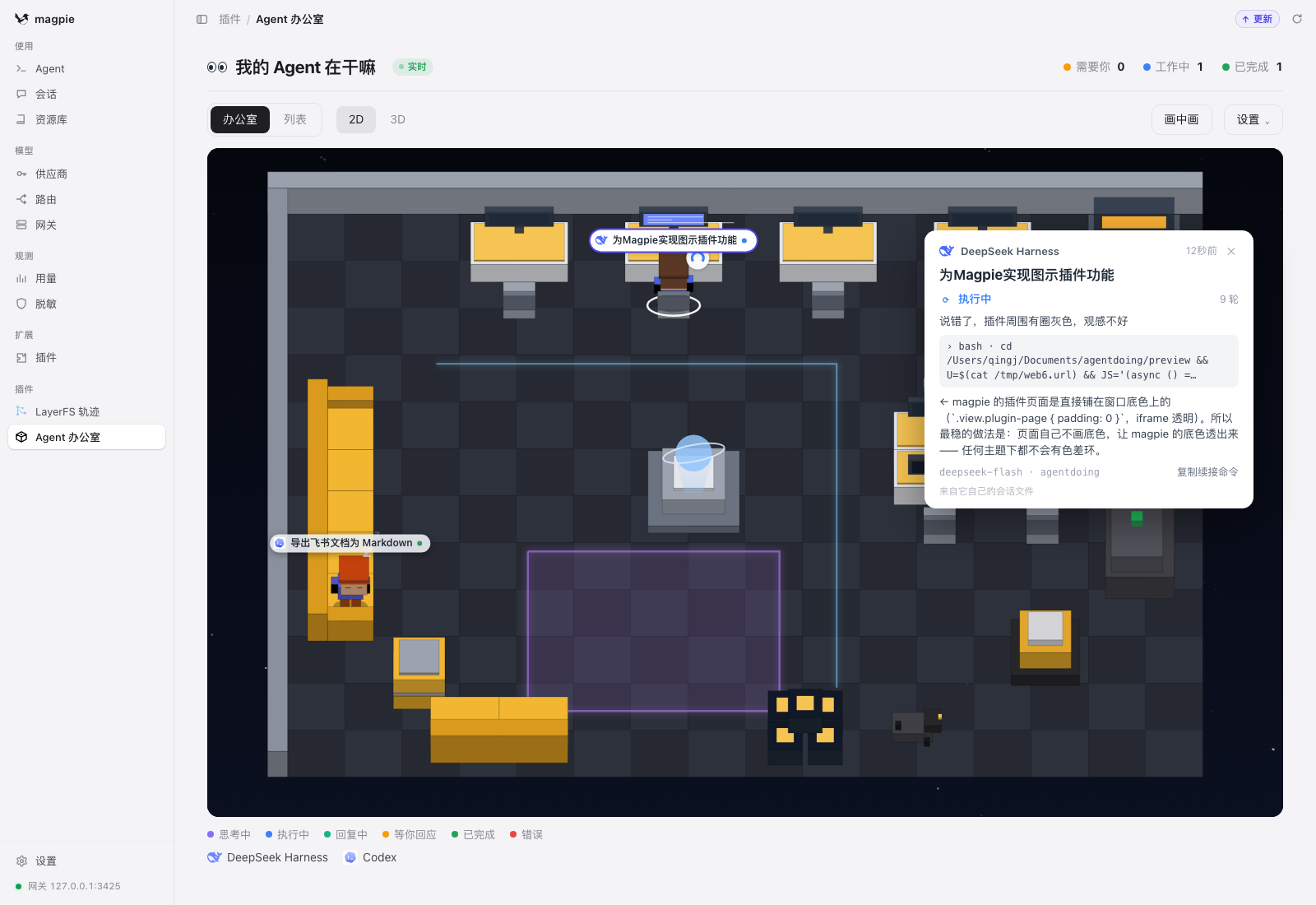
- 点击小人或列表行:查看任务、最近提问、工具步骤、回复摘要和续接命令。
- 画中画:可拖动、可缩放的悬浮小窗,✕ 或 Esc 放回。
支持直接读取会话文件的 Agent:Claude Code、Codex、DeepSeek Harness、Gemini CLI、Qwen Code、Pi、omp、Qoder、WorkBuddy、CodeBuddy。其他 Agent(Cursor、OpenCode、Copilot、Kimi 等)在通过 magpie 的模型工作时也会显示。
它会读取什么: 这些 Agent 写在本机的会话文件,包括提问、回复和工具命令,并在插件自己的目录里生成 page/live.js 供页面显示。设置里关闭「显示提问和回复」后只保留状态与工具名,不再写入提问、回复或命令参数。
仓库带有 magpie-plugin topic,因此也会出现在 插件 › 发现 › 非官方插件 · GitHub。插件市场的收录进展见 magpie-community/plugins。
功能与状态 · 数据来源 · 隐私 · 设置 · 限制 · 开发测试
Where a worker is, is what it is doing
| Status | Where | Sign |
|---|---|---|
| Thinking · 思考中 | at a desk | … |
| Running tools · 执行中 | at a desk, typing, its screen lit | spinner, how long it has run |
| Replying · 回复中 | at a desk | lines |
| Waiting for you · 等你回应 | in the purple square, waving | ! |
| Done · 已完成 | on the sofa, asleep after 20 minutes | z |
| Error · 错误 | at the broken console | × |
The counts at the top are how many need you (waiting for an approval or an answer, failed, or stuck), how many are working and how many are done. Below, real sessions: DeepSeek Harness running a tool, Codex done on the sofa, the panel of the first opened by a click:
Which way each worker faces
A seat says which way its owner looks: at a desk the sitter faces the desk, so the monitor stands on the desk's far edge with its lit side toward them and the chair's back behind; on the left wall's sofa they look east and on the front sofa north, away from the backrest. The head shows a face when that side is toward the camera, a profile when it is east, and the back of the head when it is away.
Movement and idle gestures
Completed agents occasionally stretch, glance sideways, swing their legs or nod off. Their schedules differ, and these gestures pause while walking or working. The new gestures respect the system's reduced-motion preference; name tags remain steady.
Sofas are blocked to normal foot traffic, including the space behind their backrests. Each seat has a front approach: walk through the aisle, board from the front, then leave by that same approach. Rerouting midway through boarding first returns to the aisle. Path smoothing checks every crossed grid cell, and an unreachable destination never falls back to walking straight through furniture.
How it knows
From each agent's own session file, as the agent writes it — not a guess from traffic. The plugin's host part (it runs in magpie's plugin host while magpie is open) reads them every 1.5 seconds, only what changed:
| Agent | File it reads |
|---|---|
| Claude Code | ~/.claude/projects/*/*.jsonl |
| Codex | ~/.codex/sessions/YYYY/MM/DD/rollout-*.jsonl (+ session_index.jsonl for titles) |
| DeepSeek Harness | ~/.dsh/sessions/*/*/session.v4.jsonl.zstd |
| Gemini CLI · Qwen Code | ~/.gemini/tmp/*/chats/session-*, ~/.qwen/tmp/*/chats/session-* |
| Pi · omp | ~/.pi/agent/sessions/*/*.jsonl, ~/.omp/agent/sessions/*/*.jsonl |
| Qoder · WorkBuddy · CodeBuddy | their projects/*/*.jsonl (Claude Code's format) |
The *_HOME / *_CONFIG_DIR variables those agents honour are honoured here too. What each file says decides the status outright: a tool call with no result yet is running, an approval asked (Codex's exec_approval_request, DeepSeek Harness's approval/asked, Gemini's awaiting_approval) is waiting for you, a question tool is asked you something, the turn's end is done, an interruption is stopped, an error turn is error. A turn whose file hasn't moved for ten minutes is shown as stuck.
Every other agent (Cursor, OpenCode, Copilot, Kimi…) shows while it works through magpie: the module is also an asynchronous gateway hook that sees its requests. The hook returns no body, so no request changes.
Both write page/live.js beside the page, which the page loads every second (a plugin page has no network; its own files it may load). The green live dot by the title turns grey if the host stops writing.
All 60 agents magpie knows are named with their own icons, the files magpie itself shows (page/icons, from magpie's assets, MIT).
Using it
Hovering only highlights a worker. Click a worker, its name tag or a row in the list to open its panel — the task, the last thing you asked, the step it's on, how its answer begins, its model and folder, and Resume command, shown selected so ⌘C / Ctrl+C copies it — which stays at the side until you close it (✕ or Esc) or click another agent.
Privacy
- It reads the agents' session files on this computer, only reads them, and only the last two days'. Through the gateway it records only requests made on this computer (magpie's
origin: local) unless you set"remote": true. live.jsholds the agent, the session id, the folder name and path, the model, the last prompt (200 characters), the first 280 characters of the last answer, and the names and targets of the last tool calls. It never holds a key, a header or a whole conversation. With"text": false(Settings › Show prompts and replies, off) it keeps statuses and tool names only.live.jsstays in the plugin's folder and is never sent anywhere. The page asks magpie for no data at all: itspermissionslist is empty.
Picture in picture
Picture in picture (画中画) lifts the office into a small window of the page's own, over the rest of it: drag its bar to move it, drag its corner to reshape it, click ✕ or press Esc to put it back. Only the agents that need you keep their name tags there; hover any of them for the card.
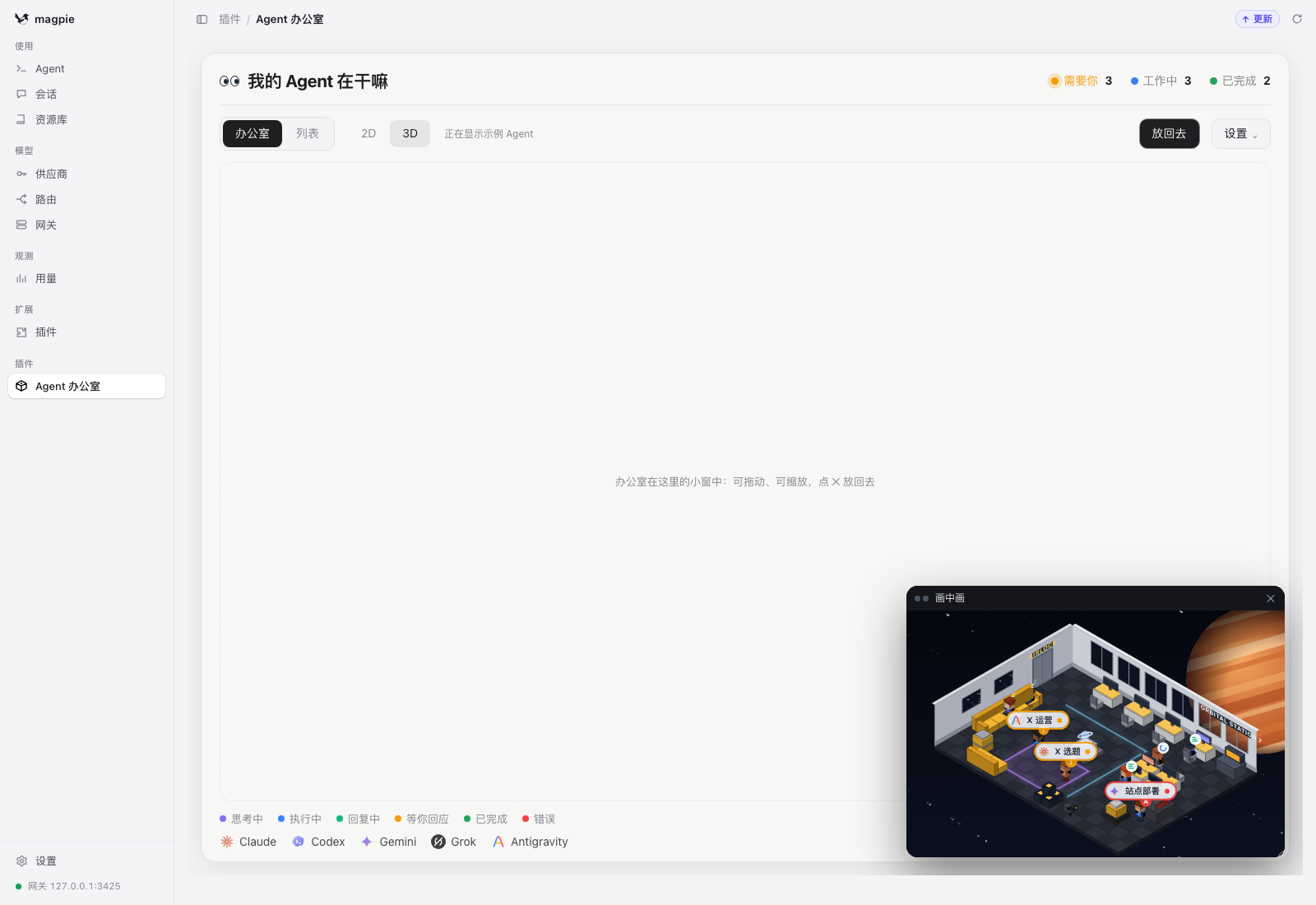
magpie frames a plugin's page with allow="" and sandbox="allow-scripts", so the browser's own floating window (a <video>'s picture-in-picture, or documentPictureInPicture) is refused a page inside it — that was tried first, and it left nothing on screen. A window drawn in the page is not.
Options
{ "mode": "office", "dim": "3d", "demo": false, "showDone": true, "hideAfter": "6h", "text": true, "remote": false }
| Key | |
|---|---|
mode |
office or list |
dim |
3d or 2d |
demo |
show sample agents (Settings › Sample agents) |
showDone |
keep finished agents on the sofa |
hideAfter |
when a finished or failed agent leaves: 1h, 6h, 24h, never |
text |
keep prompts and replies (false: statuses and tool names only) |
remote |
the gateway part also records requests from other computers and gateway keys |
approvalAfterSec |
for an agent seen only through the gateway: how long its tools run before it counts as waiting for you (90) |
The page saves the first five as you change them; a change restarts the plugin's host (magpie's options do), so it waits until it has been left alone a moment.
What it cannot know
- An agent whose files it doesn't read and that doesn't use magpie's models. It has no record here at all.
- The model's word-by-word progress. A file is written per message, so "replying" means the session's file is moving and the model has begun its answer.
- Sessions older than two days, or more than the latest 40: they are left out to keep each read cheap.
Files
lib/readers.mjs— each agent's session format turned into its phase, step, prompt and answer. No I/O.lib/scan.mjs— finds the files in each agent's folder and rereads only the ones that changed.lib/track.mjs— what the gateway hook keeps, from requests and replies in each API (Anthropic Messages, Chat Completions, Responses, Gemini). No I/O, so the tests drive it directly.office.hooks.mjs— the host part: scans every 1.5 s, sees the gateway's requests, writespage/live.js.page/agents.js,page/icons/— every agent magpie knows, with its own icon.page/model.js— statuses, counts, words (English and Chinese), agent marks, resume commands and sample agents, with no DOM.page/scene.js— the office, drawn on a canvas in isometric 3D or top-down 2D.page/icons.js,page/app.js,page/index.html,page/style.css— the page.
Test
bun test
Checked in magpie 0.1.1318's own window (magpie web), in every view: 3D, 2D, list, and the window of its own.
License
MIT